
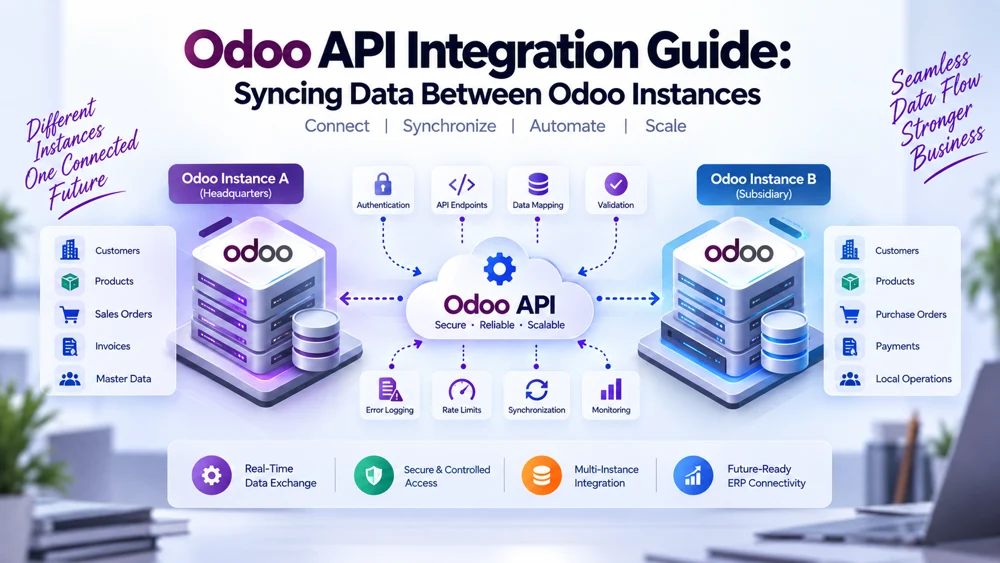
Odoo API Integration Guide: Syncing Data Between Odoo Instances
Odoo API integration connects separate Odoo environments so business data can move between them securely, automatically, and according to clearly defined rules. With properly designed Odoo API data synchronization, organizations can exchange customers, products, sales orders, inventory records, invoices, payments, and other ERP information between independent databases without depending on repetitive manual exports and imports.
This becomes particularly useful when an organization operates multiple companies, subsidiaries, branches, regional databases, acquired businesses, or customized Odoo environments that cannot practically operate from a single database.
However, reliable API integration involves much more than sending one request from one server to another.
A production-ready Odoo API integration needs the right authentication, API endpoints, permissions, data mapping, validation rules, synchronization logic, monitoring, performance controls, and error logging.
It must also answer important business questions:
Which Odoo instance owns each record?
Which data should synchronize?
Should synchronization be one-way or bi-directional?
What happens when the same record changes in both databases?
How should failed API requests be handled?
How can duplicate records be prevented?
How should growing transaction volume be managed?
This guide explains how Odoo instance integration works, how current Odoo APIs can support data exchange, and what developers and businesses should consider when designing reliable integrations between independent ERP databases.
What Is Odoo API Integration?
Odoo API integration is the process of using Odoo's external interfaces to allow another system or Odoo instance to interact with approved ERP data and business operations.
Instead of employees manually copying information between applications, software communicates programmatically.
For example, one Odoo database may create a customer.
The integration detects or retrieves that customer, validates the information, transforms required fields, and creates the corresponding customer in another Odoo database.
The same architecture can be used for:
Products
Customers
Suppliers
Sales orders
Purchase orders
Inventory records
Invoices
Payments
Price lists
Master data
Custom Odoo models
When both systems are Odoo, the process is commonly referred to as Odoo instance integration or Odoo database integration.
Why Use an API to Connect Odoo Instances?
Separate Odoo databases do not automatically behave like one system.
Each database maintains its own:
Record IDs
Users
Permissions
Configurations
Custom modules
Company structures
Products
Customers
Workflows
Accounting rules
An API provides a controlled communication layer.
Instead of giving one database direct unrestricted access to another database, an integration can request or update specific information according to approved permissions.
This creates a more manageable foundation for Odoo API data synchronization.
Common Odoo API Integration Use Cases
Organizations use Odoo API integration for many different reasons.
Connecting Headquarters and Subsidiaries
A parent organization may maintain products or master records centrally while subsidiaries manage their own operational transactions.
The API can synchronize selected information between those environments.
Connecting Regional Odoo Databases
International businesses may maintain separate databases because of local accounting, tax, language, currency, or operational requirements.
Integration can keep selected records aligned without removing regional independence.
Connecting Acquired Businesses
A newly acquired business may already operate an independent Odoo environment.
Rather than immediately migrating everything into one ERP database, an API connection can create an interim or permanent bridge.
Connecting Different Odoo Configurations
Two companies may both use Odoo but have different custom fields, modules, workflows, or data structures.
A custom Odoo integration can transform information as it moves between them.
Creating Centralized Reporting
Regional databases may send selected information into another environment used for group-level reporting or analytics.
Understanding the Current Odoo API Architecture
Odoo's external integration architecture has evolved.
For current Odoo environments, developers should verify the API available in the exact Odoo version and deployment being integrated.
Odoo 19 introduced the JSON-2 external API, which exposes model operations through HTTP using structured JSON requests.
The general pattern is:
/json/2/<model>/<method>
For example, an integration may interact with a model such as:
res.partner
and execute an approved method such as a search or read operation.
The important point is that an Odoo API integration should be designed for the actual Odoo version in use rather than assuming every version provides identical interfaces.
Developers can review the official Odoo External API documentation when planning the technical implementation.
Authentication in Odoo API Integration
Authentication establishes which user or service is making an API request.
This is critical because API connections can potentially interact with important ERP information.
In current Odoo API architecture, API keys can be used for external access.
The API request should authenticate as a user whose permissions match what the integration actually needs.
A strong implementation should avoid using unrestricted administrative credentials simply because they are convenient.
Instead, create a dedicated integration identity with the minimum required access.
For example, an integration responsible only for synchronizing products may not need access to employee records or sensitive financial information.
Why Dedicated Integration Users Are Important
A dedicated integration user provides better control.
Benefits include:
Clear API activity tracking
Restricted permissions
Easier credential rotation
Better auditing
Lower security exposure
Easier troubleshooting
If one API key becomes compromised, limited permissions can reduce the potential impact.
This principle is especially important for Odoo database integration involving multiple production environments.
API Key Management
API credentials should be treated like passwords.
They should never be:
Hard-coded into public source code
Stored in public repositories
Shared through unsecured documents
Included in browser-side code
Logged in plain text
Secure integrations normally store credentials in protected environment variables, secret-management systems, or another controlled configuration mechanism.
Keys should also be rotated according to the security policy of the organization and the capabilities of the Odoo version being used.
Understanding Odoo API Endpoints
An endpoint identifies where an API request should be sent.
In the current JSON-2 architecture, the URL structure includes the model and method.
Conceptually:
POST /json/2/model/method
The request can also include:
Authentication information
Database information where required
Context
Record IDs
Named method arguments
This allows an integration to interact with Odoo's business models rather than directly manipulating the underlying database tables.
That distinction is important.
A well-designed Odoo API integration should generally use approved application interfaces and business logic instead of bypassing Odoo and writing directly to production database tables.
Why Direct Database Writes Can Be Risky
Odoo business operations may involve more than inserting values into a table.
Creating or updating a record can trigger:
Validation
Computed fields
Access controls
Related records
Automation
Business logic
Workflow behavior
Direct database manipulation may bypass these mechanisms.
Using proper APIs and model methods helps keep the integration aligned with Odoo's application logic.
How Odoo API Data Synchronization Works
A typical Odoo API data synchronization process has several stages.
1. Detect the Data That Needs Synchronization
The integration needs a way to identify new or changed information.
Possible approaches include:
Event-driven triggers
Scheduled polling
Timestamp-based queries
Queued synchronization jobs
Custom integration logic
The best approach depends on the business requirement.
2. Read the Source Record
The integration retrieves the required information from the source Odoo instance.
For example, a customer synchronization process may need:
Customer name
Email
Phone
Address
Tax information
Customer reference
Company
Payment terms
Only fields required by the destination workflow should normally be retrieved and transferred.
3. Validate the Source Data
Before sending information to another system, validate it.
For example:
Is the customer name available?
Is the email properly formatted?
Is the company valid?
Does the destination support the referenced currency?
Are required related records available?
Validation prevents bad information from spreading between ERP environments.
4. Map the Data
The source and destination databases may use different structures.
That requires data mapping.
5. Find the Destination Record
Before creating a new record, determine whether the corresponding record already exists.
This helps prevent duplicates.
6. Create or Update the Record
The integration sends the appropriate API request.
7. Record the Result
Successful and failed operations should be logged.
This creates an audit trail and supports troubleshooting.
Data Mapping Between Odoo Instances
Data mapping determines how fields and values in one Odoo environment correspond to another.
Even two Odoo databases may not be identical.
For example, Odoo Instance A could use:
x_customer_segment = Enterprise
while Odoo Instance B uses:
x_client_type = Corporate
A custom Odoo integration may map:
Enterprise → Corporate
before sending the value.
Mapping may be required for:
Customer categories
Products
Product categories
Currencies
Units of measure
Taxes
Warehouses
Price lists
Sales stages
Status values
Company references
Custom fields
The more different the databases are, the more important the mapping layer becomes.
Record IDs and External Mapping
One major mistake in Odoo instance integration is assuming that internal record IDs match across databases.
They usually should not be treated as universal identifiers.
For example:
Odoo Instance A:
Product ID = 145
Odoo Instance B:
Product ID = 892
Both may represent the same product.
The integration needs a mapping mechanism.
A possible relationship could be:
Instance A Product 145 → Integration Key P-1009 → Instance B Product 892
The integration can store this relationship and reuse it for future updates.
Using Business Identifiers
Depending on the record type, matching may also use:
SKU
Barcode
Customer reference
Tax number
External ID
Email address
Integration-specific UUID
The correct identifier depends on the business object.
Names alone are often unreliable because names can change and may not be unique.
Data Transformation
Sometimes mapping a field directly is not enough.
Values may need to be transformed.
Examples include:
Converting date formats
Normalizing phone numbers
Converting units
Mapping tax codes
Converting selection values
Standardizing text
Changing currency-related formats
Combining fields
Splitting fields
These transformations should be explicitly documented.
Hidden transformation rules can make future maintenance difficult.
One-Way Odoo API Synchronization
One-way synchronization moves data in one direction.
Example:
Headquarters Odoo → Regional Odoo
The headquarters database may control product master data.
When products change centrally, regional databases receive updates.
Regional systems do not send product-master changes back.
This architecture is relatively simple because ownership is clear.
Bi-Directional Odoo API Synchronization
Bi-directional synchronization moves data both ways.
Example:
Odoo Instance A ↔ Odoo Instance B
Both systems may create customers.
The integration must then determine:
Whether the customer already exists
Which fields each system can modify
What happens when both update the same field
Which change takes priority
How synchronization loops are prevented
Bi-directional Odoo API integration requires significantly more governance than one-way synchronization.
Defining the Source of Truth
Every synchronized data object should have a clearly understood source of truth.
For example:
| Data Type | Source of Truth |
|---|---|
| Products | Headquarters |
| Global SKU | Headquarters |
| Local pricing | Regional instance |
| Regional customers | Regional instance |
| Inventory | Warehouse instance |
| Group reporting | Central environment |
Without clear ownership, both systems may repeatedly overwrite one another.
Avoiding Synchronization Loops
Consider this scenario:
Instance A updates a customer.
The API sends the update to Instance B.
Instance B records the change.
The integration identifies the change as a new update.
It sends the same record back to Instance A.
The cycle repeats.
A mature Odoo API integration needs a way to identify the origin of synchronized changes.
Possible techniques include:
Integration IDs
Source markers
Synchronization metadata
Timestamps
Event IDs
Update-origin flags
The correct method depends on the integration architecture.
Data Validation Before API Writes
Validation protects the destination database.
An incoming sales order might require:
Existing customer
Valid products
Valid company
Correct currency
Valid taxes
Appropriate warehouse
Required quantities
Valid payment terms
If a dependent record does not exist, the integration may need to synchronize that record first or move the transaction into an exception queue.
Blindly submitting incomplete data can create operational problems.
Why Dependency Management Matters
ERP records are connected.
A sales order depends on products and customers.
An invoice may depend on an order, partner, taxes, accounts, and company.
A purchase transaction may depend on vendors, products, currency, and procurement rules.
Therefore, API synchronization should respect record dependencies.
The sequence of operations matters.
API Transactions and Data Consistency
When several operations belong to one business action, integration design should consider transaction boundaries carefully.
For example, processing a payment or reservation may involve related operations that should succeed or fail together.
Modern Odoo API documentation advises developers to be careful when splitting dependent work across separate API calls because concurrent database activity can occur between requests.
Where possible, related operations that require atomic consistency should be designed around an appropriate server-side method.
Error Logging in Odoo API Integration
Error logging is essential.
Without logs, an integration can fail silently while users assume the databases remain synchronized.
Logs should help answer:
Which record was being processed?
Which Odoo instance sent it?
Which destination received it?
Which endpoint was called?
Was the operation successful?
What error occurred?
Has the request been retried?
Does someone need to investigate?
This makes production support much easier.
Types of API Errors
Not every failure has the same cause.
Authentication Errors
The API key may be invalid, expired, revoked, or associated with insufficient permissions.
Validation Errors
A required field may be missing or contain an invalid value.
Record Mapping Errors
The destination record may not exist or may be mapped incorrectly.
Permission Errors
The integration user may not have permission to read or update the requested model.
Network Errors
The destination server may temporarily be unavailable.
Business Logic Errors
The requested action may violate an Odoo business rule.
Custom Module Errors
A customized field or model may behave differently than expected.
Different failure categories should have different recovery processes.
Retry Logic for Failed API Requests
Temporary failures should not necessarily require human intervention.
For example, a short connection problem may disappear within seconds.
An integration may use controlled retry logic with increasing delays between attempts.
However, retries should not continue indefinitely.
A validation error caused by a missing product will not normally be fixed by sending the same request hundreds of times.
Retries should be reserved for errors likely to be temporary.
Idempotency and Duplicate Prevention
A reliable integration should consider what happens when the same transaction is submitted more than once.
Imagine an order request reaches the destination successfully, but the response is lost because of a network issue.
The source system may assume the request failed and retry it.
Without duplicate prevention, two sales orders could be created.
Using integration identifiers and duplicate-checking logic can help make synchronization safer.
API Performance and Rate Limits
Performance planning becomes important when an integration handles large data volumes.
An organization may need to synchronize:
Thousands of customers
Tens of thousands of products
High-volume sales orders
Frequent inventory updates
Sending unnecessary individual requests can reduce efficiency.
The integration should consider:
Batch size
Pagination
Incremental synchronization
Queues
Caching
Request frequency
Retry delays
Concurrent processing
Server capacity
Does Odoo Have One Universal API Rate Limit?
Integration teams should not assume one universal API request limit applies to every Odoo endpoint, hosting environment, and integration scenario.
Some services or endpoints may have specific restrictions, while hosting infrastructure, reverse proxies, custom controllers, or external services may impose additional limits.
For this reason, rate limits and throughput expectations should be tested against the exact production environment.
A good integration should also behave responsibly even when no strict limit is reached.
Incremental Synchronization
Instead of repeatedly retrieving every record, an integration can synchronize only information that changed since the previous successful run.
For example:
Last successful synchronization:
10:00
Next run:
retrieve records modified after 10:00
This can dramatically reduce unnecessary API traffic.
The integration should still account for edge cases involving timestamps, failed transactions, and delayed records.
Full Synchronization vs Incremental Synchronization
A full synchronization may be useful during initial migration or reconciliation.
However, continuously performing full database synchronization can become inefficient.
A common architecture is:
Initial full synchronization
Establish record mappings
Begin incremental synchronization
Periodically reconcile important records
This approach can provide both efficiency and reliability.
Scheduled vs Real-Time API Synchronization
Not every integration needs real-time processing.
Real-Time or Near-Real-Time
Useful for:
Orders
Inventory
Payments
Critical operational updates
Scheduled Synchronization
Useful for:
Reporting
Historical data
Large batch updates
Lower-priority master data
A hybrid model may provide the best balance.
Queue-Based Integration Architecture
For high-volume Odoo API integration, a queue can separate transaction creation from API processing.
Instead of requiring the source user to wait for the destination system, the source process places a synchronization task into a queue.
A worker then processes it.
This approach can improve:
Reliability
Retry management
Performance
Error isolation
Scalability
Queues are especially useful when destination systems may occasionally become unavailable.
Monitoring Odoo API Data Synchronization
Logs tell you what happened.
Monitoring tells you whether the integration is healthy.
Useful monitoring metrics may include:
Successful requests
Failed requests
Pending synchronization jobs
Average processing time
Retry count
Oldest pending transaction
Authentication failures
Data validation failures
Synchronization volume
Alerts can notify administrators when unusual conditions appear.
Security Best Practices
Security should be designed into Odoo API integration from the beginning.
Important practices include:
Dedicated API users
Minimum required privileges
Secure key storage
Credential rotation
Encrypted HTTPS communication
Access auditing
Input validation
Restricted models
Controlled logging
Separate test and production credentials
Never log API secrets or expose them in frontend JavaScript.
Testing an Odoo API Integration
Testing should include more than successful requests.
Authentication Testing
Confirm valid credentials work and invalid credentials are rejected.
Permission Testing
Verify the integration cannot access unauthorized models or records.
Record Creation Testing
Check whether new records are created correctly.
Update Testing
Verify approved fields change without overwriting protected data.
Duplicate Testing
Send the same record twice and verify duplicate prevention.
Validation Testing
Submit missing or invalid fields.
Dependency Testing
Attempt to synchronize an order whose product is not mapped.
Network Failure Testing
Simulate unavailable servers.
Retry Testing
Confirm temporary failures recover safely.
Volume Testing
Process realistic transaction loads.
Conflict Testing
Update the same record in both instances and verify the intended rule is applied.
Development Environment Before Production
A custom Odoo integration should normally be tested outside the production ERP first.
Development or staging environments allow teams to test:
API keys
Mapping
Custom modules
Error cases
Data transformations
Performance
Upgrade compatibility
Production ERP databases often contain business-critical information, so experimentation should be controlled.
Odoo Version Compatibility
Odoo's external APIs evolve over time.
An integration designed for an older Odoo version may use different interfaces from a new deployment.
For example, newer Odoo versions provide the JSON-2 external API while older integrations may rely on XML-RPC or JSON-RPC interfaces.
The legacy RPC interfaces are being deprecated, so organizations maintaining long-term integrations should plan migrations instead of assuming older interfaces will remain available indefinitely.
This makes version awareness a major part of Odoo instance integration.
Avoid Hard-Coding Odoo-Specific Assumptions
An integration may initially connect two nearly identical databases.
Over time, one database may add:
New fields
Custom modules
Different categories
New companies
New workflows
New Odoo versions
An architecture that depends on rigid assumptions can become difficult to maintain.
Where appropriate, mappings and integration rules should be configurable.
Common Odoo API Integration Mistakes
Using Administrator Credentials
Integrations should normally use dedicated accounts with limited permissions.
Synchronizing Every Field
Only synchronize information the destination actually needs.
Assuming Internal IDs Match
Use reliable mappings or business identifiers.
No Source of Truth
Define who owns each synchronized record or field.
Ignoring Validation
Incorrect data can spread rapidly between systems.
No Error Logging
Silent failures create dangerous data inconsistencies.
Unlimited Retries
Permanent errors should not be retried forever.
Ignoring Duplicate Requests
Network failures can create duplicate transactions if requests are not designed safely.
Ignoring Odoo Versions
API architecture can differ between versions.
Building Before Understanding the Workflow
Technical integration should follow business rules, not define them.
When Custom Odoo Integration Is Necessary
A standard connector may work when requirements are straightforward.
A custom Odoo integration may be needed when:
Multiple Odoo databases use different custom fields
Complex data transformation is required
Special business rules control synchronization
High transaction volumes need queue-based processing
Bi-directional synchronization is required
Advanced conflict resolution is necessary
Custom modules participate in workflows
Integration needs specialized validation
Several companies or databases must participate in the same process
Custom development should solve a genuine business requirement rather than adding complexity unnecessarily.
Planning an Odoo API Integration Project
A structured project usually follows several stages.
Step 1: Identify the Odoo Instances
Document versions, hosting, modules, customizations, companies, and users.
Step 2: Define the Business Process
Understand why information needs to move.
Step 3: Identify Data Objects
List customers, products, orders, invoices, or other records involved.
Step 4: Define Data Ownership
Determine which system controls each record or field.
Step 5: Define Authentication and Permissions
Create a secure access model.
Step 6: Define Endpoints and Methods
Determine which API interfaces and model operations are required.
Step 7: Design Data Mapping
Document all field and value transformations.
Step 8: Define Validation
Establish acceptance rules for incoming data.
Step 9: Define Synchronization Direction
Choose one-way, two-way, or selective synchronization.
Step 10: Design Error Handling
Separate temporary failures from permanent data problems.
Step 11: Test
Test successful and unsuccessful scenarios.
Step 12: Deploy and Monitor
Track production performance, failures, and changing business requirements.
When Odoo API Integration Creates the Most Value
The strongest business case usually exists when employees currently act as the connection between systems.
Common signs include:
Repeated CSV exports
Manual imports
Duplicate order entry
Recreating customers in several databases
Copying product information manually
Inventory discrepancies
Delayed reporting
Frequent reconciliation
Missing transactions
Unclear data ownership
In these situations, Odoo API integration can replace repetitive human coordination with structured automation.
Odoo API Integration with Altapete Solutions
Businesses operating multiple Odoo databases need more than technical API connectivity.
They need an architecture that understands data ownership, mappings, validation, synchronization direction, failures, security, and long-term maintenance.
Altapete Solutions provides Odoo API Integration for organizations that need to connect independent Odoo environments and automate controlled data flows between them.
The existing Odoo-to-Odoo integration service supports requirements such as multi-instance connectivity, real-time synchronization, data mapping, validation, custom integration, and complex multi-company environments.
For businesses with specialized processes, the integration should be designed around the actual ERP workflow rather than forcing the organization into a generic connector.
Choosing an Odoo API Integration Partner
A capable integration partner should understand both Odoo development and integration architecture.
Before choosing a provider, ask how they will handle:
API authentication
User permissions
Data mapping
Record identifiers
Source-of-truth rules
Duplicate prevention
Validation
Error logging
Retry logic
Performance
Security
Odoo upgrades
Monitoring
Custom modules
The provider should also be able to explain what happens when the integration fails.
A demo where everything works is not enough.
Production systems need a plan for when something goes wrong.
Final Thoughts
Odoo API integration creates a controlled bridge between independent Odoo databases, allowing organizations to automate information exchange without forcing every company or operation into one ERP environment.
The technical connection itself is only one part of a successful solution.
Reliable Odoo API data synchronization also requires secure authentication, appropriate endpoints, accurate data mapping, dependable record matching, strong validation, controlled retries, performance planning, and detailed error logging.
Organizations must also define who owns the information.
Without a source of truth and clear synchronization rules, even technically successful API requests can create inconsistent ERP data.
For organizations operating multiple companies, regional databases, acquired businesses, or customized environments, a well-designed Odoo database integration can reduce manual work while preserving the independence each environment needs.
The best Odoo API integration is therefore not the one sending the largest number of requests.
It is the one that moves the correct data, at the correct time, to the correct system, with enough validation, security, and monitoring to remain reliable as the business grows.
Frequently Asked Questions About Odoo API Integration
1. What is Odoo API integration?
Odoo API integration uses Odoo's external application interfaces to connect Odoo with another database, software platform, or Odoo instance. It allows approved data and operations to be exchanged automatically between systems.
2. Can two Odoo instances synchronize data through an API?
Yes. Odoo API data synchronization can exchange customers, products, orders, inventory information, invoices, and other approved records between separate Odoo environments according to defined synchronization rules.
3. How does Odoo API authentication work?
Current Odoo external API architecture can use API keys to authenticate requests. The integration should use a dedicated user with only the permissions needed for its workflow and store API credentials securely.
4. What is data mapping in Odoo API integration?
Data mapping defines how fields and values in one system correspond to fields and values in another. It is important when two Odoo instances use different custom fields, categories, status values, taxes, or other configurations.
5. How can duplicate records be prevented?
A reliable Odoo database integration can use external IDs, integration identifiers, SKUs, customer references, tax IDs, or other stable matching rules to identify existing records before creating new ones.
6. Can Odoo API integration work in real time?
Yes, depending on the architecture and business requirements. Time-sensitive transactions may use real-time or near-real-time processing, while lower-priority information can be synchronized on a schedule.
7. Does Odoo API integration have rate limits?
Teams should verify limits for the exact Odoo deployment and endpoints being used instead of assuming one universal limit for every integration. Integration architecture should still control request frequency, retries, concurrency, and transaction volume to protect performance.
8. What happens when an Odoo API request fails?
A reliable integration should record the failure through error logging, classify the error, and determine whether it should be retried automatically or sent for manual investigation. Permanent validation problems should not be retried indefinitely.
9. When is custom Odoo integration necessary?
A custom Odoo integration may be appropriate when businesses have unique workflows, different database structures, custom modules, complex mappings, high transaction volumes, bi-directional synchronization, or specialized validation requirements.
10. How should businesses choose an Odoo API integration partner?
Choose a provider that can explain authentication, permissions, mapping, validation, record ownership, duplicate prevention, retries, security, monitoring, performance, custom modules, and Odoo version compatibility—not simply how to send an API request.