
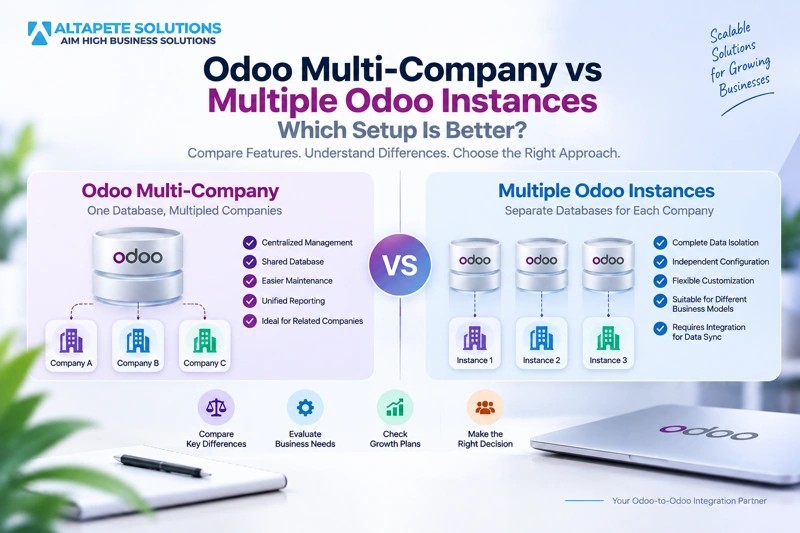
Odoo Multi-Company vs Multiple Odoo Instances: Which Setup Is Better?
Odoo multi company vs multiple instances is one of the most important architecture decisions for organizations managing several companies, subsidiaries, brands, regions, or business units. Both options can support complex business structures, but they handle data isolation, configuration, reporting, upgrades, and day-to-day operations very differently.
An Odoo multi-company setup allows multiple companies to operate inside one shared Odoo environment, while multiple Odoo databases keep each business in a separate ERP environment. The right choice depends on how closely your companies work together, how much independence they require, and how much data needs to move between them.
A shared setup can simplify administration, reporting, and intercompany workflows, but separate instances can provide stronger operational independence and more flexible customization. If separate environments still need to exchange data, businesses may also need Odoo instance integration to keep products, customers, orders, inventory, and reporting information aligned.
This guide compares Odoo multi company vs multiple instances from a practical business and technical perspective so you can decide which setup is better for your organization.
What Is Odoo Multi-Company?
Odoo multi-company allows an organization to manage more than one company inside the same Odoo environment. Each company can maintain its own accounting, warehouses, taxes, users, transactions, and configuration while still operating within a shared ERP platform.
This structure is particularly useful when several companies are closely related and use similar processes. Central finance, management, purchasing, or IT teams can work across several companies without maintaining completely separate Odoo installations.
The shared environment can also make selected data easier to manage because companies can use common products, contacts, or resources when the business rules allow it. At the same time, permissions must be configured carefully so users see only the information they are authorized to access.
Organizations considering this setup can also review Odoo’s official multi-company documentation for current guidance on managing multiple companies within one Odoo environment.
What Are Multiple Odoo Instances?
Multiple Odoo instances mean that each company, region, or business unit operates its own independent Odoo environment. Each instance can have a separate database, users, hosting setup, custom modules, workflows, integrations, and upgrade schedule.
This architecture gives individual businesses much more independence. A regional company can use local modules, specific tax configurations, custom workflows, or specialized integrations without affecting other companies in the group.
The disadvantage is that separate systems do not automatically share information. If several instances need the same customers, products, orders, or reporting data, the organization must establish a reliable synchronization strategy.
This is where Odoo instance integration becomes important because it allows independent databases to exchange selected information without forcing them into one shared ERP environment.
Odoo Multi-Company vs Multiple Instances: The Core Difference
The biggest difference in Odoo multi company vs multiple instances is whether companies share one technical ERP environment or operate independently. This affects almost every part of system management.
With multi-company, companies share the same broader Odoo environment, which makes centralized administration easier. With multiple instances, each environment can operate according to its own technical and business requirements.
Multi-company usually reduces the need for internal integration because the companies already exist inside one system. Multiple instances provide stronger separation but often increase the need for synchronization.
The better choice depends on whether your organization values centralization or operational independence more strongly.
Shared Database vs Separate Databases
A shared database can simplify many cross-company processes because users and records already exist inside the same environment. Reporting, user administration, master data, and intercompany operations can often be managed without transferring information between separate systems.
With multiple Odoo databases, every environment maintains its own data. A product or customer created in one instance will not automatically appear in another unless the organization builds a synchronization process.
This separation can be beneficial when companies should remain independent, but it also creates additional work whenever information needs to be shared.
When comparing Odoo multi company vs multiple instances, businesses should therefore ask how much information genuinely needs to move between companies.
Data Isolation in Odoo Multi-Company
Data isolation in a multi-company environment is controlled through permissions, company access, record rules, and configuration. Users can be restricted to one company while selected managers or shared-service employees can work across multiple companies.
For many organizations, this provides enough separation. Companies can maintain different accounting records, warehouses, transactions, and local processes without operating completely independent infrastructure.
However, they still share the same overall Odoo environment. System-level changes, major upgrades, shared custom modules, and infrastructure decisions may affect several companies at the same time.
If a business requires complete technical independence between entities, separate Odoo instances may provide a stronger boundary.
Data Isolation With Multiple Odoo Instances
Multiple instances provide stronger technical data isolation because each database exists independently. Changes made in one instance do not automatically affect the configuration or records of another environment.
This can be useful for subsidiaries with separate management teams, regional IT policies, regulatory requirements, or independent implementation partners.
It also means that one company can introduce a major customization or local integration without requiring every other company to adopt the same setup.
The trade-off is that stronger isolation creates greater synchronization and administration requirements when the companies still need to share information.
When Odoo Multi-Company Is Usually Better
Odoo multi-company is often a better fit when companies follow similar business processes and benefit from centralized administration. Businesses that share finance teams, products, customers, reporting requirements, or technology governance can often operate more efficiently in one environment.
This approach can reduce duplicated configuration and make it easier for management teams to view information across companies. Employees who work across legal entities may also find a shared environment easier to use.
Multi-company is particularly attractive when differences between companies are mainly legal or accounting-related rather than operational.
If the companies can reasonably standardize their ERP processes, a shared architecture can reduce long-term complexity.
When Multiple Odoo Instances Are Usually Better
Separate Odoo instances are often more suitable when companies require significant operational independence. Different regions may have different regulatory rules, workflows, custom modules, infrastructure policies, or development roadmaps.
A subsidiary may also require its own implementation partner or upgrade schedule. Keeping that business inside a shared environment could create unnecessary dependencies between teams that operate very differently.
Multiple instances are also common after mergers and acquisitions because the acquired business may already have a stable Odoo environment that the organization does not want to replace immediately.
In these cases, separate environments can remain independent while integration handles only the information that needs to be shared.
Customization Differences
Customization is a major consideration in Odoo multi company vs multiple instances. In a shared environment, custom modules may affect several companies even if only one company requested the feature.
This can be positive when the organization wants standardized workflows, because development can be reused across the group. However, it can become difficult when one business unit requires specialized functionality that is irrelevant or disruptive to others.
With multiple instances, each company can customize Odoo more independently. One business can introduce a specialized module without changing another company’s ERP environment.
The more different your business units are, the more valuable this customization independence may become.
Upgrade Management
In a multi-company setup, major Odoo upgrades normally affect the entire shared environment. All companies must therefore be prepared for the same technical release and testing process.
This can simplify version control because everyone remains on the same platform. However, it can also delay an upgrade if one company has a custom module or workflow that is not ready.
Multiple instances allow different businesses to upgrade at different times. A regional company can move forward while another instance remains on its current version.
The downside is that Odoo instance integration may become more complex when connected systems run different versions and use different models or fields.
User Management and Access
One shared environment generally simplifies user administration. Employees who need access to several companies can use the same account with permissions configured according to their responsibilities.
This is especially useful for central finance, management, procurement, or IT teams that regularly work across several entities.
With multiple Odoo databases, the same employee may need separate access to multiple environments. User provisioning, password management, security reviews, and offboarding can therefore require additional effort.
For organizations with many cross-company users, this administrative difference can influence the architecture decision.
Intercompany Workflows
Intercompany workflows are often simpler in a shared multi-company environment because both organizations already operate inside the same broader system.
For example, one company may sell goods to another company within the group. Related sales and purchasing workflows can often be coordinated more directly when both entities exist inside the same Odoo environment.
With multiple instances, the same process crosses a database boundary. A sales order in one system may need to create a purchase order or related transaction in another environment.
The more frequently companies transact with each other, the more important this difference becomes when comparing Odoo multi company vs multiple instances.
Master Data Management
Master data includes customers, suppliers, products, categories, currencies, units of measure, price lists, and other records used repeatedly throughout business processes.
In a multi-company environment, businesses can often manage shared master data more efficiently because the records exist inside the same system.
With separate databases, the organization needs to decide which instance owns each type of master data. Product updates created centrally may need to synchronize with regional databases, while regional customer information may need to flow back to headquarters.
Without clear ownership rules, multiple environments can gradually develop inconsistent records.
Synchronization Between Multiple Odoo Instances
When businesses choose separate environments, synchronization becomes one of the most important design considerations. The organization must decide exactly what information needs to move between systems.
For example, headquarters may need product data distributed to subsidiaries while regional instances send sales or inventory information back to a central system.
Some information may need near-real-time synchronization, while other data can be transferred periodically. The business impact of delay should determine synchronization frequency.
A good Odoo instance integration should also include record matching, validation, duplicate prevention, error handling, monitoring, and conflict-resolution rules.
One-Way Synchronization
One-way synchronization is often the simplest and safest approach when one system clearly owns the information.
For example, a central Odoo database may manage global product information and send approved product updates to several regional instances.
Regional users can continue managing local inventory or other locally owned fields without changing the central product master.
This approach reduces conflicts because data ownership is clear and information follows one controlled direction.
Bi-Directional Synchronization
Bi-directional synchronization allows information to move in both directions between Odoo instances. This may be required when users in more than one environment need to create or modify shared records.
For example, customers may be created in regional databases and synchronized with headquarters, while headquarters can also update selected customer information.
This architecture provides flexibility but requires more careful conflict handling. If both systems update the same field, the integration needs to determine which value should be accepted.
Two-way synchronization should therefore be used only when the business process genuinely requires it.
Conflict Resolution
Conflict resolution becomes important whenever multiple systems can modify the same information.
A central instance may control product names while regional environments control local prices. This field-level ownership prevents one system from overwriting information managed by another.
When both systems need access to the same field, a clear conflict rule is required. The organization may use master-system priority, manual approval, or another controlled strategy.
Reliable integration should define these rules before production rather than waiting for conflicts to appear.
Reporting and Analytics
Reporting is generally easier in a shared multi-company environment because information already exists inside one Odoo system.
Management teams can build cross-company views without first collecting data from several independent databases.
With multiple instances, reporting may require a central data warehouse, analytics platform, or synchronization process that brings selected information together.
This does not make separate instances a poor choice, but the reporting architecture should be included in the decision from the beginning.
Performance Considerations
A shared multi-company environment concentrates users, transactions, reports, integrations, and automated jobs into one system.
As the organization grows, infrastructure and database performance need to support the combined workload of all companies.
Multiple instances distribute activity across separate systems. Heavy transaction volume in one company is less likely to directly affect another environment.
However, integration infrastructure now has to handle the data moving between those systems, so performance complexity does not disappear completely.
Reliability and Failure Isolation
Multiple instances can provide stronger failure isolation. If one environment experiences a technical problem, other independent Odoo systems may continue operating.
In a shared multi-company environment, a major outage can potentially affect every company using the same system.
That does not automatically make multiple instances more reliable. They also create more servers, databases, backups, and integrations that need monitoring and maintenance.
Businesses should evaluate whether centralized resilience or independent failure isolation is more important to their operating model.
Security Considerations
Both architectures can be secure when designed correctly, but they use different security approaches.
Multi-company relies heavily on access permissions, company settings, record rules, and correct configuration inside the shared environment.
Separate databases provide stronger infrastructure-level separation, but integration creates new security responsibilities. API credentials, integration users, data-transfer services, and authentication mechanisms must be protected carefully.
Security should therefore be evaluated across the complete architecture rather than assuming that separate databases automatically solve every security concern.
Regulatory and Regional Requirements
International companies often have regional requirements that differ significantly between countries. Taxes, accounting rules, government integrations, local modules, and regulatory processes may vary.
An Odoo multi-company environment can support many company-specific configurations, but some organizations need deeper independence because local operations are highly specialized.
Separate instances can allow each country or region to optimize its own ERP environment without affecting other companies.
Headquarters can then use integration to receive only the data needed for central reporting, planning, or intercompany activity.
Mergers and Acquisitions
Mergers and acquisitions are one of the strongest use cases for multiple Odoo instances.
An acquired company may already have years of business data, custom modules, trained staff, and working integrations. Migrating everything immediately into the parent company’s database can create unnecessary risk.
A more controlled approach is to keep both systems running while synchronizing important information between them.
Over time, management can decide whether full consolidation is valuable or whether the connected multi-instance architecture should remain permanent.
Franchise and Distributed Business Models
Franchise networks can also benefit from separate environments when local operators require strong independence.
The parent company may control global product information, brand standards, and reporting requirements while individual locations manage their own orders, customers, employees, or inventory.
Integration can send centrally managed information outward while returning selected performance or transaction data to headquarters.
If franchise operations are highly standardized, however, multi-company may still be more efficient, so the level of local autonomy should drive the decision.
Cost of Odoo Multi-Company
A shared architecture can reduce duplicated infrastructure and integration requirements, but that does not always mean it is cheaper.
If companies have very different workflows, the organization may need significant customization to keep everyone inside one environment.
Complex permission models and exceptions can also increase implementation and maintenance effort over time.
The true cost should therefore include development, upgrades, testing, support, infrastructure, and the effort required to keep company processes compatible.
Cost of Multiple Odoo Instances
Multiple instances require separate databases, hosting, backups, monitoring, upgrades, configuration, and technical support.
When those environments need to exchange information, synchronization development and maintenance add another cost layer.
However, this architecture may reduce organizational friction when each company genuinely needs independent ERP decisions.
The better financial choice is therefore the architecture that minimizes long-term operational complexity rather than simply the one with fewer databases.
Odoo Multi-Company vs Multiple Instances for Growing Businesses
Businesses should not choose an architecture only for their current size. Future subsidiaries, acquisitions, regional expansion, transaction growth, and organizational restructuring can change ERP requirements significantly.
If new companies are likely to follow the same processes and remain centrally managed, Odoo multi-company may scale effectively.
If future business units are expected to become increasingly independent, separate instances may provide greater flexibility.
Planning several years ahead can prevent expensive migrations caused by an architecture that no longer fits the organization.
Can You Move From Multi-Company to Multiple Instances Later?
Yes, but separating an existing shared environment can become a major data migration project.
The organization needs to identify which records belong to each company, how shared master data should be divided, and what synchronization will be required once the systems become independent.
Historical records, custom modules, reports, and workflows also need to be reviewed carefully.
This is why Odoo multi company vs multiple instances should be treated as an architecture decision rather than a temporary technical preference.
Can Multiple Odoo Instances Be Consolidated Later?
Yes, separate databases can also be consolidated later.
However, independent environments often develop different products, customers, workflows, custom modules, identifiers, and configurations over time.
Before migration, the organization must decide which information becomes the standard and how duplicates or conflicting records will be handled.
In some cases, continuing with integration may be more practical than forcing several mature ERP systems into one shared environment.
When Odoo-to-Odoo Integration Makes More Sense
Integration is often the best option when separate databases are operationally necessary but some data still needs to move between them.
A regional company may need global product information, while headquarters needs sales summaries. A subsidiary may remain independent while sending selected customer or order data to a central environment.
In these scenarios, Odoo-to-Odoo Integration can connect separate systems without removing the independence that made multiple instances necessary in the first place.
The objective should be controlled information exchange rather than synchronizing every record and field simply because it is technically possible.
How to Decide Which Architecture Is Right
Start by evaluating how similar the companies are. If they use the same processes, products, reporting, and centralized management, multi-company becomes more attractive.
Next, evaluate operational independence. If businesses need separate custom modules, local infrastructure, independent upgrades, or unique workflows, multiple instances deserve serious consideration.
Then determine how much data needs to be shared. If almost every important record must synchronize between separate databases, the cost and complexity of integration may outweigh the value of separation.
The final decision should balance operational independence, data sharing, maintenance, security, reporting, and long-term growth.
Common Mistakes When Choosing the Architecture
One common mistake is assuming that every legal entity requires a separate Odoo database.
Legal separation and technical separation are not always the same thing, and many organizations can successfully manage multiple companies inside one environment.
The opposite mistake is forcing highly independent businesses into one database simply because it appears easier to administer initially.
Another mistake is choosing separate instances without calculating how many integrations, shared reports, and synchronization workflows will later be required.
How Altapete Solutions Supports Multiple Odoo Instances
Altapete Solutions supports businesses that need controlled synchronization between separate Odoo environments.
A reliable architecture should address data isolation, record matching, validation, synchronization frequency, field mapping, error handling, conflict resolution, and monitoring.
The integration should also respect which instance owns each type of information instead of allowing systems to overwrite each other unpredictably.
This approach helps separate Odoo environments remain independent while still functioning as part of a connected business ecosystem.
Which Setup Is Better?
For companies with similar processes, shared teams, centralized management, and frequent cross-company activity, Odoo multi-company is often the simpler choice.
For organizations with independent subsidiaries, significantly different workflows, separate customizations, regional requirements, or independent technology roadmaps, multiple Odoo instances may be more appropriate.
The best answer to Odoo multi company vs multiple instances depends primarily on how much operational independence the companies need.
If the businesses function as parts of one ERP ecosystem, multi-company is usually attractive. If they function as separate organizations that only need selected information shared, multiple instances with integration may be the better architecture.
Final Thoughts
Odoo multi company vs multiple instances is not simply a technical question about how many databases an organization should maintain. It affects data governance, reporting, security, upgrades, customization, scalability, and the way business units collaborate.
An Odoo multi-company environment can simplify administration and intercompany workflows when companies operate in similar ways. Multiple Odoo databases provide stronger independence when regions or subsidiaries need different ERP configurations.
If separate instances are the right operational choice, Odoo instance integration can connect them without forcing the organization to sacrifice flexibility.
The best ERP architecture is ultimately the one that reflects how your businesses actually operate while keeping data accurate, secure, scalable, and manageable.
Frequently Asked Questions
1. What is the difference between Odoo multi-company and multiple Odoo instances?
Odoo multi-company allows multiple companies to operate inside one shared Odoo environment, while multiple instances use separate databases and independent ERP environments.
Multi-company usually provides easier centralized administration, while separate instances offer greater technical and operational independence.
2. Is Odoo multi-company better than multiple instances?
Neither option is automatically better. Multi-company works well when companies share processes and administration, while multiple instances are better suited to highly independent business units.
The decision should consider customization, data sharing, security, reporting, upgrades, and long-term business strategy.
3. Can multiple companies use the same Odoo database?
Yes. Odoo supports multiple companies within the same environment.
Permissions and company access still need to be configured carefully so users can access only the records and companies relevant to their responsibilities.
4. Why would a company use multiple Odoo databases?
Organizations may use multiple Odoo databases when subsidiaries have different workflows, custom modules, regulatory requirements, hosting policies, or upgrade schedules.
This architecture is also common after acquisitions and in international business groups.
5. Can multiple Odoo instances synchronize with each other?
Yes. Separate Odoo environments can exchange data through Odoo instance integration.
Customers, products, orders, inventory, invoices, and other records can be synchronized according to controlled mapping and ownership rules.
6. Which setup provides better data isolation?
Multiple instances provide stronger technical data isolation because each environment has its own database.
Multi-company can still provide strong user and company-level separation inside a shared environment when permissions are configured correctly.
7. Is Odoo multi-company better for intercompany workflows?
Often, yes. Intercompany workflows can be easier to manage when companies exist inside the same Odoo environment.
Separate instances can support intercompany transactions as well, but those workflows usually require integration between databases.
8. Can separate Odoo instances run different versions?
Yes. Independent instances can operate different Odoo versions.
However, synchronization between different versions may require additional mapping, testing, and compatibility work.
9. Are multiple Odoo instances more expensive?
They can be because each environment requires hosting, backups, monitoring, upgrades, maintenance, and support.
If information needs to move between the instances, integration and synchronization maintenance should also be included in the overall cost.
10. When should a business use Odoo-to-Odoo integration?
Businesses should consider Odoo-to-Odoo Integration when separate databases are necessary but selected information still needs to move between them.
This is especially useful for subsidiaries, international operations, acquisitions, franchise networks, and organizations that need both ERP independence and controlled data sharing.