
Odoo Data Migration vs Odoo Integration: What’s the Difference?
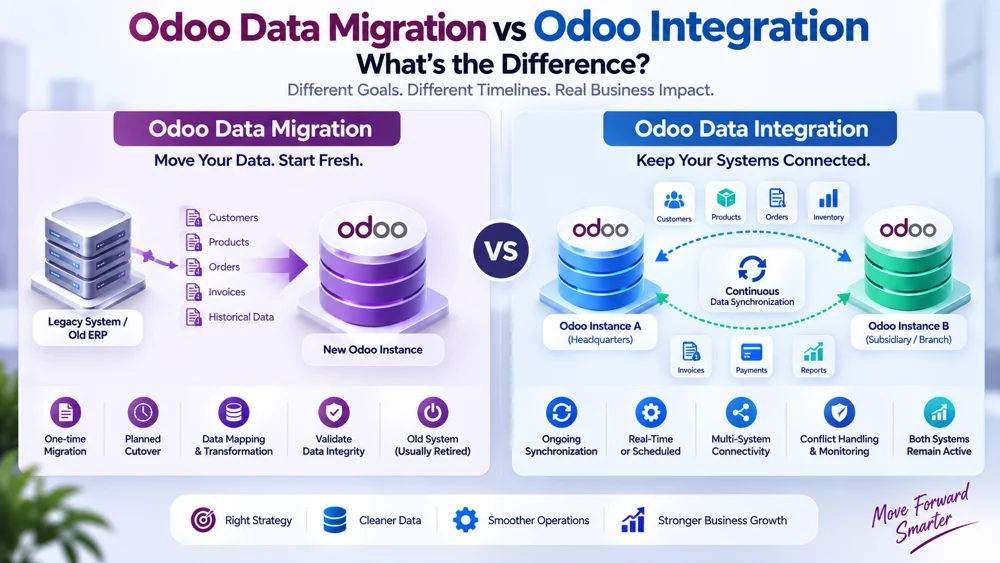
Odoo data migration vs integration is an important distinction for any business planning to move, connect, upgrade, or restructure its ERP environment. Odoo migration usually involves moving existing data from one system, database, version, or environment to another as a planned one-time transition, while Odoo data integration creates an ongoing connection that allows two or more systems to continue exchanging information after implementation.
The two approaches can involve similar technical activities, including data mapping, transformation, validation, testing, and data-quality checks. However, they solve fundamentally different business problems.
A company replacing an old ERP with Odoo may need migration.
A business keeping two Odoo instances active and continuously exchanging orders, products, customers, or inventory needs integration.
Some organizations need both.
Understanding Odoo data migration vs integration before starting a project can prevent unnecessary development, duplicate data, failed cutovers, synchronization conflicts, and costly architecture changes later.
This guide explains the difference between Odoo migration, Odoo integration services, Odoo data synchronization, ETL, one-time migration, continuous synchronization, cutover planning, data integrity, and the situations where each approach makes sense.
Odoo Data Migration vs Integration: The Quick Answer
The simplest difference is:
Migration moves data to a new destination so the business can transition.
Integration keeps systems connected so they can continue exchanging data.
Think of migration as moving from one office to another.
You pack your files, furniture, and equipment, move them to the new location, verify everything arrived correctly, and begin operating there.
Integration is different.
Integration is more like building a permanent transportation route between two offices that both remain active.
Information keeps moving between them because both locations continue serving a purpose.
That difference is at the heart of Odoo data migration vs integration.
Odoo Data Migration vs Integration Comparison
| Area | Odoo Data Migration | Odoo Data Integration |
|---|---|---|
| Main objective | Move existing data | Connect active systems |
| Typical duration | Project-based | Ongoing |
| Data movement | Usually one-time or staged | Continuous or scheduled |
| Source system | Often retired or reduced afterward | Usually remains active |
| Destination | Becomes operational system | Works alongside other systems |
| Common process | Extract, transform, load, validate | Detect, map, synchronize, monitor |
| Synchronization | Not normally permanent | Core requirement |
| Cutover | Usually important | May not require a major cutover |
| Conflict resolution | Limited after final migration | Often essential |
| Error monitoring | Critical during migration | Required continuously |
| Main risk | Missing or corrupted migrated data | Systems becoming inconsistent |
| Typical use case | ERP replacement or upgrade | Multi-system or multi-instance environment |
This table gives a high-level answer, but real ERP projects often require deeper analysis.
What Is Odoo Data Migration?
Odoo migration is the process of transferring data, configuration, or business records from an existing environment into a target Odoo environment.
The source could be:
An older Odoo database
A different ERP platform
A legacy business application
Spreadsheets
Custom software
Another Odoo instance
Multiple disconnected systems
The objective is usually to prepare the destination system to take over the role previously performed by the source.
Once the migration is successfully completed, the old environment may be retired, archived, or retained only for historical reference.
That is why migration is often described as a one-time migration even though the project itself may involve several test migrations before the final production move.
What Data Can Be Migrated to Odoo?
An Odoo migration project may involve:
Customers
Vendors
Products
Product variants
Price lists
Inventory
Warehouses
Sales orders
Purchase orders
Invoices
Payments
Accounting balances
Employees
CRM records
Manufacturing data
Project information
Historical transactions
Custom records
Not every historical record necessarily needs to move.
One of the first migration decisions should be determining what information is genuinely required in the new environment.
What Is Odoo Data Integration?
Odoo data integration creates an active connection between Odoo and another system or Odoo database.
Instead of moving data once and ending the relationship, integration allows information to continue flowing.
For example:
Odoo Instance A ↔ Odoo Instance B
Both environments remain operational.
The integration may synchronize:
Customers
Products
Inventory
Sales orders
Purchase orders
Invoices
Payments
Master data
Status changes
The connection may operate in real time, near real time, or according to a scheduled process.
This ongoing nature is the most important difference when discussing Odoo data migration vs integration.
The Biggest Difference: One-Time Migration vs Continuous Sync
The easiest way to determine what you need is to ask one question:
Will both systems still need to exchange data after the project is complete?
If the answer is no, the project is likely migration-focused.
If the answer is yes, the business probably needs integration.
One-Time Migration
A one-time migration may look like:
Old ERP → New Odoo
Once users begin operating in the new Odoo environment, the old ERP is no longer responsible for daily operations.
Continuous Synchronization
Integration may look like:
Odoo A ↔ Odoo B
Both systems remain active.
Information continues moving between them.
This ongoing Odoo data synchronization needs monitoring, conflict handling, authentication, error recovery, and maintenance.
Example of Odoo Data Migration
Imagine a company currently uses a legacy ERP.
The business decides to replace it with Odoo.
The company needs to move:
20,000 customers
8,000 products
Vendor records
Open invoices
Inventory balances
Open sales orders
Historical accounting information
The project team extracts the data from the legacy system.
They clean it.
They transform the fields into an Odoo-compatible structure.
They load it into a test environment.
Users validate it.
After successful testing, a final cutover is completed.
Employees begin working in Odoo.
The old ERP is retired.
That is migration.
Example of Odoo Data Integration
Now imagine a business group with two subsidiaries.
Each subsidiary operates its own Odoo database.
Both databases need to remain active.
Headquarters maintains products.
Subsidiaries manage local sales.
The integration continuously exchanges:
Master products
Customer information
Inventory status
Orders
Reporting data
Neither database is being replaced.
The systems need a permanent connection.
That is Odoo data integration.
Businesses needing this type of architecture can explore Altapete Solutions' Odoo Data Integration service for connecting and synchronizing independent Odoo environments.
Why Businesses Confuse Migration and Integration
The confusion around Odoo data migration vs integration exists because both projects move data.
The difference lies in what happens afterward.
Both may involve:
APIs
Scripts
ETL
Field mapping
Data transformation
Validation
Testing
Database access
Record identifiers
Because the technical tools overlap, businesses sometimes assume migration and integration are interchangeable.
They are not.
The architecture, risks, timeline, support requirements, and long-term costs can be very different.
What Is ETL in Odoo Migration?
ETL stands for:
Extract → Transform → Load
It is a common data-processing pattern in migration projects.
Extract
Data is retrieved from the source system.
For example:
Database records
CSV files
ERP exports
APIs
Legacy applications
Transform
The source information is cleaned and converted into a structure the destination can understand.
Transformation might include:
Changing field names
Converting dates
Normalizing phone numbers
Mapping product categories
Converting status values
Combining fields
Splitting fields
Removing duplicates
Load
The transformed data is imported into Odoo.
This cycle may be repeated several times during testing before the final production migration.
Is ETL Only Used for Migration?
No.
ETL techniques can also be used in integration.
The difference is frequency.
During migration, ETL may be performed as part of a limited transition project.
During integration, similar transformation logic may execute continuously.
For example:
An order leaves Odoo Instance A.
Its fields are transformed.
The record enters Odoo Instance B.
Tomorrow another order follows the same process.
That recurring behavior makes it integration rather than migration.
What Is Data Mapping?
Data mapping defines how information in the source corresponds to information in the destination.
Suppose the old system contains:
client_name
but Odoo expects a partner record.
The migration needs to map the source information correctly.
Similarly, one Odoo environment might use:
x_customer_class = Wholesale
while another expects:
x_partner_category = B2B
Integration needs to define the relationship between those values.
Data mapping is therefore important in both Odoo migration and Odoo data integration.
Data Mapping in Migration
During a migration, mappings are generally designed to move the existing dataset into the target structure.
For example:
Old ERP:
customer_code
New Odoo:
external_reference
Once the migration is complete, that transformation may no longer need to run continuously.
Data Mapping in Integration
Integration mapping remains active.
Every new or updated synchronized record may pass through the same mapping rules.
Therefore, integration mappings must be maintainable over time.
If a custom field changes six months later, the integration may need to be updated.
This ongoing maintenance requirement is another major difference in Odoo data migration vs integration.
What Is Cutover?
Cutover is the controlled transition from the old operational environment to the new one.
It is especially important in migration.
A cutover plan may determine:
When users stop entering data into the old system
When the final export occurs
When final data is transformed
When the production Odoo database is loaded
When validation happens
When employees begin using the new system
What happens if serious problems are discovered
Cutover planning reduces the risk that records created during the transition are missed.
Why Cutover Matters in Migration
Imagine a business exports customer records Friday evening.
The migration team loads them into Odoo on Saturday.
Meanwhile, employees continue creating orders in the old ERP.
Those new orders may never reach Odoo unless the project has a clear cutover process.
This is why production migration often requires either:
A temporary system freeze
A final delta migration
A controlled transition window
Another method for capturing late changes
For customized Odoo database upgrades, Odoo's own guidance recommends extensive testing and rehearsing the production upgrade process before the final change. Businesses handling version-related migrations can review the official Odoo database upgrade guidance.
Does Integration Need a Cutover?
Integration may require deployment planning, but it does not always involve the same type of permanent cutover.
Both systems may continue operating before and after the integration launches.
The transition might instead include:
Deploy integration
Perform initial synchronization
Validate mappings
Enable live synchronization
Monitor transactions
There is no assumption that one connected system disappears afterward.
Data Integrity in Migration
Data integrity means ensuring that migrated information remains accurate, complete, consistent, and usable.
Migration can damage data if records are:
Missing
Duplicated
Incorrectly mapped
Truncated
Assigned to the wrong company
Linked to incorrect records
Converted incorrectly
Migration validation should therefore compare the source and destination.
For example:
Source customers: 10,250
Target customers: 10,250
But record counts alone are not enough.
Teams should also validate relationships and important field values.
Data Integrity in Integration
Integration has a different challenge.
Data must remain consistent continuously.
A system might be synchronized today but become inconsistent tomorrow because:
An API fails
A mapping changes
A required record is missing
A credential expires
A user edits the same record in both databases
A custom module changes
A synchronization job stops running
Therefore, Odoo data synchronization needs ongoing monitoring.
Migration integrity is heavily focused around the transition.
Integration integrity must be maintained for the lifetime of the connection.
Odoo Data Migration vs Integration: Data Ownership
Data ownership is important in both approaches, but it becomes especially important in integration.
During Migration
The old system is initially the source.
After cutover, the target Odoo environment normally becomes the operational source.
Ownership transfers.
During Integration
Both systems remain active.
The organization needs explicit ownership rules.
For example:
Headquarters controls:
Global products
SKU
Product categories
Regional instance controls:
Local customers
Regional prices
Local inventory
Without ownership rules, synchronization conflicts can occur.
What Is Continuous Odoo Data Synchronization?
Odoo data synchronization keeps selected information aligned across systems after the initial connection is established.
It may operate:
In real time
Near real time
Every few minutes
Hourly
Daily
The right frequency depends on the business requirement.
Inventory may need frequent synchronization.
Management reporting may not.
Continuous synchronization distinguishes integration from a traditional one-time migration.
One-Way Integration
Integration does not necessarily mean every system can change everything.
A one-way architecture may look like:
Headquarters Odoo → Subsidiary Odoo
Products move from headquarters to the subsidiary.
The subsidiary cannot send product-master changes back.
This provides ongoing integration while maintaining simple ownership.
Bi-Directional Integration
A two-way relationship may look like:
Odoo A ↔ Odoo B
Both systems can send and receive information.
This creates additional requirements around:
Conflict resolution
Duplicate prevention
Timestamps
Record ownership
Loop prevention
Validation
These requirements typically do not remain relevant after a completed Odoo migration because the source is no longer participating in everyday operations.
Migration Does Not Automatically Mean Integration
A business may migrate data successfully and still have no ongoing integration.
For example:
Legacy CRM → Odoo CRM
All customer and opportunity information is moved.
The old CRM is shut down.
No future exchange occurs.
That is migration only.
Integration Does Not Automatically Require Migration
Likewise, integration can be implemented without a major migration.
Suppose two existing Odoo systems already contain the required information.
The project may simply:
Match existing records
Establish IDs
Configure synchronization rules
Begin exchanging future changes
There may be an initial reconciliation, but the purpose is ongoing connectivity rather than replacement.
When You Need Both Migration and Integration
This is common in complex ERP projects.
Consider a company acquiring another business.
The acquired company uses a separate Odoo instance.
The business wants:
Historical customer data migrated into headquarters.
Both ERP instances to remain active temporarily.
New orders synchronized during the transition.
The subsidiary migrated completely later.
This project needs both Odoo migration and integration.
The architecture may evolve through several phases.
Phase 1: Initial Data Migration
Core historical records are transferred.
Phase 2: Temporary Integration
Both systems remain connected while teams transition.
Phase 3: Final Cutover
Remaining operational data is migrated.
Phase 4: Integration Retirement
Once the legacy database is retired, the temporary synchronization can be removed.
This illustrates why businesses should understand Odoo data migration vs integration before choosing technical tools.
Migration Between Odoo Versions
Migration can also refer to moving an Odoo database or its data to a newer Odoo version.
Version changes may involve:
Model changes
Field changes
Custom modules
Views
Workflows
Database structures
Third-party applications
This can require data transformations and upgrade scripts.
Version migration is different from connecting two simultaneously active Odoo environments.
The first prepares the database for the new environment.
The second creates ongoing communication.
Migration from Another ERP to Odoo
Another common scenario is replacing systems such as a legacy ERP with Odoo.
The migration process may include:
Discovery
Identify existing data and business processes.
Data Audit
Determine which information is accurate and worth moving.
Mapping
Map old fields to Odoo structures.
Cleansing
Remove duplicates and correct invalid information.
Transformation
Convert data into compatible formats.
Test Migration
Load information into a non-production environment.
Validation
Have technical teams and business users review the results.
Final Migration
Load approved production data.
Cutover
Transition users to Odoo.
After this process, the previous ERP is normally no longer responsible for daily operations.
Integration Between Two Odoo Instances
Now compare that with ongoing Odoo data integration.
The project may involve:
Business Process Analysis
Determine why the systems need to communicate.
Data Ownership
Choose the authoritative source for each record.
API or Integration Architecture
Determine how information moves.
Mapping
Map corresponding models and fields.
Initial Matching
Identify equivalent records across databases.
Synchronization Logic
Define when and how data moves.
Conflict Resolution
Define what happens when the same record changes twice.
Error Monitoring
Track failed transactions.
Long-Term Maintenance
Update the integration as Odoo instances evolve.
There is no final point where synchronization becomes unnecessary unless the business architecture changes.
Migration Testing vs Integration Testing
Testing strategies are also different.
Migration Testing
Migration testing focuses heavily on:
Completeness
Record counts
Field accuracy
Relationships
Historical data
Opening balances
Data integrity
User acceptance
Cutover readiness
Integration Testing
Integration testing needs to validate ongoing behavior.
That includes:
Record creation
Updates
Duplicate prevention
Conflicts
Failed APIs
Retries
Mapping changes
Authentication
Performance
Synchronization loops
A migration can be declared complete.
Integration testing continues whenever major system changes occur.
Downtime Considerations
Downtime can be a major migration concern.
During a final cutover, users may temporarily need to stop working in the legacy system so the latest information can be migrated safely.
The exact downtime depends on:
Data volume
Migration architecture
Database size
Transformations
Validation
Hosting
System complexity
Integration projects can often be deployed with less disruptive transition because the objective is to connect existing systems rather than replace them.
However, production integrations still need careful deployment and monitoring.
Data Cleaning Before Migration
Migration is an opportunity to improve data quality.
Businesses should consider whether they really want to move years of:
Duplicate customers
Invalid vendors
Obsolete products
Broken addresses
Incorrect categories
Unused accounts
Old test records
Migrating every record can bring legacy problems into the new ERP.
A good Odoo migration project identifies what should be cleaned, archived, transformed, or excluded.
Data Cleaning in Integration
Integration needs a different strategy.
Because data keeps arriving, quality controls should operate continuously.
For example, an integration may reject a customer if:
Required fields are missing
The tax identifier is invalid
The company mapping is unknown
A duplicate already exists
This means data integrity controls become part of the ongoing synchronization process.
Cost Differences Between Migration and Integration
The cost structure can also differ.
Odoo Migration Cost Factors
Migration cost may depend on:
Number of records
Source-system complexity
Data quality
Number of modules
Historical data requirements
Custom fields
Version differences
Transformation requirements
Testing
Cutover complexity
Most costs occur during the migration project.
Odoo Integration Cost Factors
Odoo integration services may depend on:
Number of connected systems
Number of synchronized models
One-way vs bi-directional sync
API complexity
Transaction volume
Mapping complexity
Custom workflows
Monitoring requirements
Error handling
Security
Ongoing support
Integration can have a longer maintenance lifecycle because the connection remains operational.
Migration Architecture Is Temporary by Nature
The technical scripts or ETL jobs used for migration may not need to remain active permanently.
They exist to move the required information successfully.
Once the destination becomes the operational environment, those tools may be archived.
This is why migration architecture should prioritize:
Accuracy
Repeatability
Testability
Cutover reliability
Integration Architecture Must Be Maintainable
Integration code can remain operational for years.
Therefore, maintainability becomes critical.
Good Odoo data integration should include:
Clear configuration
Mapping documentation
Logging
Monitoring
Security controls
Retry logic
Version awareness
Support procedures
An integration that works only when its original developer is available is not a strong production architecture.
What Happens When Migration Fails?
Migration failures may involve:
Missing records
Incorrect transformations
Import errors
Duplicate records
Broken relationships
Wrong balances
Because migrations are usually rehearsed, the project can often correct these problems and rerun the process before final cutover.
Rollback planning is important when production changes begin.
What Happens When Integration Fails?
Integration failure is different because users may continue operating while synchronization is broken.
For example:
Odoo A receives 100 orders.
The connection to Odoo B fails.
If the integration silently stops, users may believe both databases contain the same information when they do not.
That is why integration requires persistent monitoring and error logging.
Error Handling in Migration vs Integration
Migration
Errors are usually corrected before or during the transition project.
Integration
Errors require continuous classification.
Some may be:
Temporary
Data-related
Authentication-related
Permission-related
Business-rule related
The integration needs rules for retries, alerts, and manual intervention.
Odoo Data Migration vs Integration for Multi-Company Businesses
Multi-company organizations frequently need to make this choice.
Suppose a group owns four subsidiaries.
Option 1: Consolidate
If the companies can operate from one environment, the group may migrate them into one Odoo architecture.
Option 2: Keep Them Separate
If separate databases are required, integration may be appropriate.
Option 3: Hybrid
Some entities may migrate into the central ERP while others remain independent and integrate with it.
There is no universal answer.
The corporate structure, regulations, processes, customizations, and technical requirements should guide the decision.
When Should You Choose Odoo Data Migration?
Choose Odoo migration when the main goal is moving away from an existing environment.
Typical signs include:
Replacing a legacy ERP
Upgrading to a newer Odoo environment
Consolidating databases
Moving from spreadsheets into Odoo
Retiring an old system
Moving historical data into a new production database
The key characteristic is that the source system does not need to remain a permanent equal participant.
When Should You Choose Odoo Integration?
Choose Odoo data integration when multiple active systems need to continue sharing information.
Typical situations include:
Two active Odoo databases
Parent and subsidiary instances
Regional ERP environments
Odoo connected to eCommerce
Odoo connected to logistics platforms
Odoo connected to another ERP
Centralized reporting across databases
The key characteristic is ongoing data exchange.
When Should You Use Both?
Use both when a transition needs historical movement and temporary or permanent connectivity.
Typical examples include:
Phased ERP consolidation
Mergers and acquisitions
Gradual Odoo rollout
Multi-country ERP transformation
Legacy system retirement occurring over several stages
In these environments, migration and integration should be designed together.
Otherwise, one project may unintentionally create problems for the other.
Common Mistakes When Choosing Between Migration and Integration
Mistake 1: Treating Migration as Permanent Synchronization
Migration scripts are not automatically suitable for continuous production integration.
Mistake 2: Building Integration When Migration Would Be Simpler
If the old system will disappear in a month, building a complex permanent two-way integration may be unnecessary.
Mistake 3: Migrating Without Cleaning Data
Poor source data creates poor destination data.
Mistake 4: Integrating Without Defining Ownership
If both systems believe they control the same fields, conflicts can occur.
Mistake 5: Ignoring Cutover
Late transactions can be lost if migration transitions are poorly planned.
Mistake 6: Ignoring Long-Term Maintenance
An integration must continue operating after the developers finish the initial project.
Mistake 7: Assuming Data Mapping Is Only Technical
Field mappings often reflect business decisions.
The people who understand business processes should participate.
Questions to Ask Before Choosing Migration or Integration
Before starting the project, answer these questions:
Will the source system remain operational?
Will data need to continue flowing after implementation?
Which system will own each data type?
Do historical records need to move?
Is a full cutover planned?
Can users tolerate downtime?
How different are the source and target structures?
Is real-time synchronization required?
Will both systems modify the same records?
Who will maintain the solution after launch?
The answers usually make the Odoo data migration vs integration decision much clearer.
How Altapete Solutions Approaches Odoo Data Integration
Organizations sometimes approach an integration project believing they only need data copied between databases.
In reality, successful connectivity requires understanding how those systems will continue operating afterward.
Altapete Solutions' Odoo Data Integration service is designed for organizations that need active Odoo environments to exchange information through controlled synchronization.
The service page addresses areas such as:
Multi-instance synchronization
Real-time data exchange
Bi-directional synchronization
Data mapping
Validation
Conflict resolution
Error handling
Multi-company architecture
These requirements are fundamentally different from a pure one-time migration project.
If the objective is to retire the source database, migration may be the primary requirement.
If both instances remain operational, the architecture should be designed as integration.
Odoo Data Migration vs Integration: Which One Is Better?
Neither approach is inherently better.
They serve different purposes.
Migration is better when the objective is transition.
Integration is better when the objective is connection.
Migration asks:
“How do we move this information safely into the new environment?”
Integration asks:
“How do these systems continue working together reliably?”
A good ERP strategy answers the business question before choosing the technical solution.
Final Thoughts
The difference between Odoo data migration vs integration can be summarized in one concept: permanence.
Odoo migration moves data toward a new operating environment.
Odoo data integration keeps active environments connected.
Migration usually includes extraction, ETL, transformation, data mapping, testing, reconciliation, and cutover.
Integration uses many of the same concepts but adds continuous Odoo data synchronization, monitoring, conflict resolution, retries, security, and long-term maintenance.
Businesses should not choose between them based simply on the technology available.
Start with the operating model.
If the old system is being replaced, migration is likely required.
If multiple systems will remain active, integration is likely required.
If the organization is transitioning gradually while systems remain connected, both may be necessary.
Understanding this distinction early helps businesses create cleaner ERP architecture, maintain stronger data integrity, and avoid investing in a technical solution that does not match how the organization will actually operate.
Frequently Asked Questions About Odoo Data Migration vs Integration
1. What is the main difference between Odoo data migration and integration?
The main difference in Odoo data migration vs integration is that migration primarily moves existing information into a new environment, while integration creates an ongoing connection between active systems that continue exchanging data.
2. Is Odoo migration a one-time process?
Odoo migration is generally a project-based transition. Teams may perform several test migrations, but the final objective is usually a production one-time migration or cutover into the new environment.
3. What is Odoo data integration?
Odoo data integration connects Odoo with another active database or application so information can continue moving between them automatically or on a schedule.
4. Can Odoo migration and integration be used together?
Yes. A business may migrate historical data while temporarily or permanently using Odoo integration services to keep active systems synchronized during a phased transition.
5. What is ETL in Odoo migration?
ETL means extract, transform, and load. Data is extracted from the source, transformed into a suitable structure, and loaded into the target Odoo environment.
6. What is cutover in an Odoo migration?
Cutover is the controlled transition when the organization stops or reduces activity in the old system, performs the final migration, validates the new Odoo environment, and begins production operations there.
7. Does Odoo integration continuously synchronize data?
It can. Odoo data synchronization may operate in real time, near real time, or according to scheduled intervals. The appropriate frequency depends on the business process.
8. Is data mapping required for both migration and integration?
Yes. Data mapping is important in both scenarios because source and destination fields, values, categories, IDs, and structures may differ. Integration mappings usually remain active longer because new data continues passing through them.
9. When should I choose migration instead of integration?
Choose Odoo migration when the primary goal is replacing, upgrading, consolidating, or retiring an existing system. If both systems need to remain operational and exchange information, integration is generally more appropriate.
10. How do I decide between Odoo data migration and integration?
Ask whether the source system will continue operating after implementation. If it is being replaced, migration is usually the main requirement. If it remains active and needs ongoing Odoo data synchronization, an integration architecture is needed.