
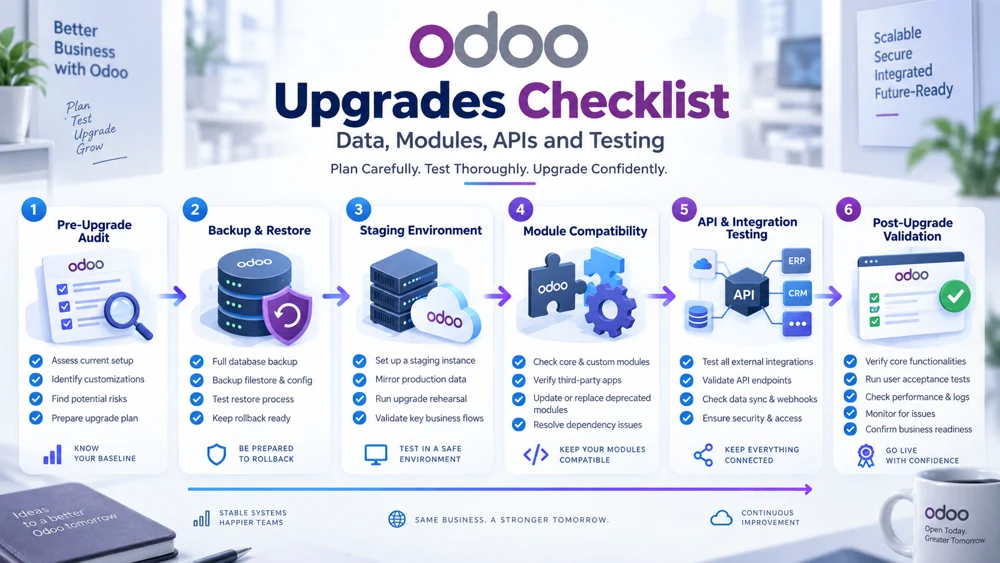
Odoo Upgrades Checklist: Data, Modules, APIs and Testing
Odoo upgrades require much more than installing a newer software version and checking whether the login page still works. If you plan to upgrade Odoo, you need to protect business data, custom modules, API connections, integrations, scheduled jobs, user permissions, and critical workflows before moving the production environment to a new version.
A successful Odoo version upgrade should leave your organization with a newer, cleaner, and more maintainable ERP system without losing records or disrupting the applications connected to it.
That requires preparation.
Businesses running standard Odoo environments need to test core modules and data. Organizations using custom development, multiple Odoo instances, payment gateways, eCommerce integrations, external APIs, logistics applications, reporting tools, or other connected systems need an even more detailed process.
This Odoo upgrades checklist covers the complete journey: pre-upgrade audit, backup, data validation, module compatibility, Odoo custom module upgrade, API review, integration testing, staging, regression testing, production deployment, rollback plan, and post-upgrade validation.
Odoo Upgrades Checklist: Quick Version
Before you upgrade Odoo, complete these essential checks:
Document the current Odoo version and target version.
Create a complete pre-upgrade audit.
Freeze non-essential custom development.
Review standard and custom modules.
Identify deprecated or unnecessary customizations.
Document every external integration and API.
Review Odoo API compatibility upgrade requirements.
Audit scheduled jobs and automated actions.
Clean and validate important ERP data.
Create a complete database and filestore backup.
Test backup restoration.
Prepare a realistic staging environment.
Complete the Odoo custom module upgrade.
Run upgrade scripts where required.
Test API authentication and permissions.
Perform full integration testing.
Run regression tests on key workflows.
Test realistic transaction volumes.
Prepare a documented rollback plan.
Rehearse the complete production upgrade.
Perform final production backup.
Upgrade production.
Run immediate smoke tests.
Complete post-upgrade validation.
Monitor integrations, logs, performance, and errors after launch.
If any critical item remains unresolved, production should not be the environment where you discover the answer.
Why Odoo Upgrades Need a Checklist
ERP upgrades affect interconnected business processes.
Sales may depend on inventory.
Inventory may depend on purchasing.
Accounting may depend on sales and purchasing.
External eCommerce applications may depend on products and stock.
Another Odoo database may depend on customers, products, and orders.
A seemingly small technical change can therefore affect several business processes.
Structured Odoo upgrades reduce this risk by making the upgrade repeatable and testable.
Without a checklist, teams often focus heavily on the database itself while overlooking:
Custom modules
APIs
External applications
Scheduled jobs
Automated actions
Access permissions
Data mappings
Synchronization jobs
Error queues
Custom reports
An Odoo database opening successfully does not prove that the complete ERP ecosystem is healthy.
Phase 1: Complete a Pre-Upgrade Audit
The first major task is a pre-upgrade audit.
Before changing anything, document what exists today.
Your audit should answer:
Which Odoo version is currently running?
Which version will you upgrade to?
Where is Odoo hosted?
Which standard modules are installed?
Which custom modules are installed?
Which third-party modules are installed?
Which APIs connect to Odoo?
Which applications send data into Odoo?
Which applications receive data from Odoo?
Which scheduled jobs run automatically?
Which custom fields are business-critical?
Which reports depend on custom code?
Which users have specialized permissions?
Which workflows differ from standard Odoo?
This inventory creates the foundation for the rest of the Odoo version upgrade.
Document Your Existing Odoo Environment
Record basic technical information such as:
Odoo edition
Current major version
Target major version
Hosting environment
Database size
Filestore size
Active users
Installed applications
Custom add-ons
Integration services
External databases
API credentials and owners
Automated actions
Do not rely on developers remembering everything.
Complex Odoo environments usually contain more dependencies than expected.
Freeze Non-Essential Development
Once the upgrade project begins, avoid adding unnecessary new features to the old version.
Imagine developers upgrade ten custom modules.
Another team then modifies three of those modules in production.
Those changes now need to be adapted, migrated, and tested again.
A development freeze helps stabilize the source environment.
Bug fixes can still be necessary, but new feature development should be carefully controlled.
Official Odoo guidance for customized database upgrades similarly recommends freezing code development while the upgrade is underway because continued development creates additional upgrade and testing work.
Challenge Existing Customizations
An upgrade is an excellent opportunity to remove technical debt.
Review every customization and ask:
Is it still required?
Does the target Odoo version now provide this feature natively?
Can configuration replace custom code?
Is anyone still using the feature?
Does another module duplicate it?
Can the workflow be simplified?
Do not automatically migrate every historical customization.
The fewer unnecessary customizations you carry forward, the easier future Odoo upgrades become.
Phase 2: Audit Standard, Third-Party, and Custom Modules
Modules are one of the most important areas to review before you upgrade Odoo.
Separate your modules into three groups.
Standard Odoo Modules
These are part of the standard Odoo platform.
Examples include:
CRM
Sales
Inventory
Purchase
Accounting
Manufacturing
Project
HR
Website
eCommerce
They still require workflow testing after the upgrade.
Third-Party Modules
Modules installed from partners or external developers need compatibility verification.
Check whether the module supports the target Odoo version.
Do not assume a third-party module will automatically work because it worked in the old version.
Custom Modules
Custom modules require the most attention.
An Odoo custom module upgrade may need changes to:
Python code
XML views
JavaScript
Models
Fields
Security rules
Reports
Dependencies
Controllers
Automated actions
Scheduled tasks
Odoo Custom Module Upgrade Checklist
For every custom module, check:
Module purpose is still required.
Dependencies exist in the target version.
Models are compatible.
Fields are compatible.
Views load correctly.
Reports render correctly.
Security groups still work.
Record rules behave correctly.
Computed fields return expected values.
Automated actions still run.
Scheduled jobs work.
API controllers work.
Custom JavaScript works.
Upgrade scripts run successfully.
Automated tests pass.
Odoo's upgrade guidance recommends first making custom modules functional on an empty database running the target version and then testing them against the upgraded real database.
Why Test Custom Modules on an Empty Database?
An empty target-version database helps isolate compatibility problems.
If the module cannot install or function correctly on a clean database, there is little value in debugging it against complex migrated production data.
This first test helps reveal issues with:
Removed fields
Changed models
View structures
Python methods
Dependencies
Framework changes
Once the module works cleanly, test it against the upgraded business database.
Phase 3: Review Your Data Before Upgrading
Poor data can complicate Odoo upgrades.
Before migration or upgrade testing, inspect important records for:
Duplicates
Missing values
Invalid references
Obsolete products
Inactive customer duplicates
Broken relationships
Incorrect companies
Invalid configuration
Unnecessary test records
An upgrade should not become an excuse to move every historical problem into the new environment unchanged.
Identify Business-Critical Data
Determine which records must remain accurate.
Typical examples include:
Customers
Vendors
Products
Product variants
Inventory
Warehouses
Sales orders
Purchase orders
Invoices
Payments
Accounts
Employees
Projects
Manufacturing records
Create baseline counts and important totals before the upgrade.
You can compare them again during post-upgrade validation.
Protect External and Integration IDs
If Odoo connects to external systems, identifiers may be especially important.
Examples include:
External customer IDs
Product SKUs
Integration UUIDs
API mapping IDs
Marketplace IDs
Payment references
Shipping references
If these identifiers are changed or lost during an Odoo version upgrade, integrations may start creating duplicate records instead of updating existing ones.
Phase 4: Create a Complete Backup
Never upgrade Odoo production without a recovery strategy.
A proper backup may need to include:
PostgreSQL database
Filestore
Attachments
Custom modules
Configuration files
Integration configuration
Environment variables
Server configuration
API settings
The exact requirements depend on how your Odoo environment is hosted.
Test the Backup
A backup that has never been restored is an assumption.
Test restoration in a safe environment when appropriate.
Confirm that:
Database restores
Users can log in
Attachments appear
Custom modules are available
Important records exist
Key workflows open correctly
This makes the backup useful for a real rollback plan.
Phase 5: Prepare a Staging Environment
Do not make production your first upgrade test.
Create a staging or test environment that resembles production as closely as practical.
The staging environment should ideally contain representative:
Production data
Modules
Customizations
Configuration
Security settings
Integration logic
Then perform the upgrade there first.
Isolate Staging From Production Systems
A staging copy can create unexpected problems if it retains live integration credentials.
For example, test Odoo could accidentally:
Send emails to real customers
Push test orders to another ERP
Create shipping labels
Send payment requests
Synchronize test customers into production
Trigger real webhooks
Use safe credentials or disable external actions where necessary.
Phase 6: Review API Compatibility
Businesses frequently underestimate API risk during Odoo upgrades.
An API integration may depend on:
Specific models
Field names
Field types
Methods
Authentication
User permissions
Response formats
Custom API controllers
Review each of these before upgrading production.
Odoo API Compatibility Upgrade Checklist
For every API integration, verify:
Authentication method is supported.
Integration user exists.
API credentials remain valid.
Required permissions remain available.
Models still exist.
Methods behave correctly.
Required fields still exist.
Field types remain compatible.
Custom controllers work.
Data mappings remain valid.
Error responses are handled correctly.
Scheduled synchronization jobs still run.
This Odoo API compatibility upgrade process should happen before the final cutover.
Pay Attention to Legacy API Dependencies
Odoo's external API architecture continues to evolve. Current documentation describes the JSON-2 API while older XML-RPC and JSON-RPC services are being deprecated over upcoming releases.
That does not mean every old integration immediately stops working.
It does mean businesses should identify integrations built around legacy APIs and include modernization in their long-term upgrade planning.
Review API Permissions
Even if an endpoint still exists, access permissions can change.
Test the actual integration account.
Do not test only with administrator credentials.
Verify whether the integration user can still:
Read required models
Create records
Update approved records
Execute required methods
Minimum necessary permissions are preferable to unnecessary administrator access.
Phase 7: Review Integration Mapping
Integrations often translate one application's data structure into another.
An upgrade can invalidate those mappings.
For example:
Old mapping:
External Customer Type → x_customer_type
After the upgrade, that field may:
Be renamed
Be removed
Change type
Move into another model
The integration may continue sending data but fail when it reaches Odoo.
Review every mapping used by business-critical integrations.
Phase 8: Check Scheduled Jobs and Automated Actions
A surprisingly common post-upgrade problem is a background job that no longer runs correctly.
Audit:
Cron jobs
Synchronization jobs
Automated actions
Scheduled imports
Scheduled exports
Queue workers
Report jobs
Notification jobs
After the upgrade, verify that each one:
Exists
Is enabled
Runs successfully
Uses compatible code
Does not create duplicate records
Phase 9: Run Upgrade Scripts
Some Odoo upgrades require changes to existing data structures.
Upgrade scripts can be used where custom module changes require database transformations.
Examples include:
Renaming fields
Renaming models
Renaming external identifiers
Recomputing data
Removing obsolete modules
Correcting configuration
Odoo provides upgrade utilities designed for these tasks and documents testing patterns for preserving data integrity across versions.
Test Upgrade Scripts Repeatedly
Do not run an upgrade script for the first time against production.
Test it against realistic copies of the database.
Check:
Execution success
Data accuracy
Record relationships
Performance
Repeatability
The upgrade process should become predictable before production is touched.
Phase 10: Perform Integration Testing
Integration testing confirms that Odoo still communicates correctly with connected applications.
Create a test matrix covering every major connection.
Odoo-to-Odoo Integration
Test:
Customer creation
Product updates
Sales orders
Inventory
Invoices
Bi-directional synchronization
Duplicate prevention
Conflict handling
eCommerce Integration
Test:
Product sync
Prices
Inventory
Orders
Customers
Fulfillment status
Payment Integration
Test:
Transaction creation
Status callbacks
Payment reconciliation
Error responses
Logistics Integration
Test:
Shipment creation
Tracking
Status updates
Delivery confirmation
Reporting Integration
Test:
Data extraction
Field mapping
Scheduled refresh
Permissions
Every important connection should receive its own integration testing scenario.
Test Failures, Not Only Success
A serious testing plan should deliberately create failures.
Test what happens when:
API authentication fails
A product does not exist
A required field is missing
The destination system is offline
Network timeout occurs
A duplicate transaction is submitted
A synchronization mapping is missing
Confirm that the integration logs the problem and recovers safely where appropriate.
Phase 11: Perform Regression Testing
Regression testing asks a simple question:
Does everything that worked before still work now?
The answer should cover both standard and customized workflows.
Odoo Regression Testing Checklist
Test critical end-to-end scenarios such as:
Create lead
Convert lead into opportunity
Create quotation
Confirm sales order
Reserve inventory
Deliver order
Create invoice
Register payment
Create purchase order
Receive products
Process return
Manufacture product
Run critical reports
Create customer through API
Synchronize product
Process external order
Execute scheduled integrations
These tests reveal interactions that isolated module checks can miss.
Use Realistic Business Scenarios
Do not test only with perfect sample records.
Use scenarios that resemble your actual operations.
For example:
Multi-company order
Foreign currency sale
Partial delivery
Refund
Product variant
Customer with multiple addresses
Multi-warehouse stock
Inter-company transaction
Complex workflows are where hidden upgrade issues often appear.
Phase 12: Run User Acceptance Testing
Technical success does not guarantee operational success.
Users from important departments should validate the upgraded environment.
Include representatives from areas such as:
Sales
Accounting
Inventory
Purchasing
Operations
Manufacturing
Customer service
Ask them to run daily tasks in the upgraded environment.
Users often notice workflow problems developers overlook.
Phase 13: Validate Performance
A workflow can technically succeed but become much slower after an Odoo version upgrade.
Compare performance before and after.
Monitor:
Login time
Large list views
Report generation
Sales order confirmation
Inventory operations
API response time
Synchronization speed
Queue processing
Database load
Use realistic data volumes rather than testing only one record at a time.
Phase 14: Prepare a Rollback Plan
Every production upgrade should have a documented rollback plan.
The plan should answer:
What conditions trigger rollback?
Who decides?
Which backup is used?
How is the database restored?
How is the filestore restored?
What happens to transactions created during the upgrade window?
How are external integrations paused?
How will users be informed?
Do not wait until a critical failure occurs to design recovery.
Define Rollback Triggers
Examples could include:
Severe data corruption
Critical integrations unavailable
Orders cannot be processed
Financial transactions fail
Inventory becomes unreliable
Essential custom modules cannot operate
Different organizations will have different thresholds.
Define them before the upgrade.
Phase 15: Rehearse the Upgrade
A rehearsal is one of the most valuable parts of professional Odoo upgrades.
Run the complete production process against a recent database copy.
Measure:
Upgrade duration
Module upgrade duration
Script duration
Validation duration
Integration reconfiguration
Testing time
Document every manual step.
Odoo's official customized-database upgrade guidance recommends extensive testing and a full rehearsal before upgrading the live production database.
Build a Production Runbook
Your runbook might contain:
Notify users.
Pause integrations where necessary.
Stop scheduled jobs.
Create final backup.
Confirm backup success.
Begin upgrade.
Deploy compatible custom modules.
Execute upgrade scripts.
Validate database.
Configure integration credentials.
Run technical smoke tests.
Run API tests.
Run business tests.
Re-enable integrations.
Re-enable scheduled jobs.
Begin monitoring.
Obtain final approval.
This turns the production event into a controlled procedure.
Phase 16: Final Production Backup
Immediately before the live upgrade, create the final production backup according to your hosting architecture.
This copy should represent the last reliable pre-upgrade state.
Confirm:
Backup timestamp
Database
Filestore
Code version
Configuration
Do not assume an old backup from several days earlier is sufficient for an active ERP environment.
Phase 17: Upgrade Production
Production deployment should closely follow the rehearsed runbook.
Avoid introducing unexpected changes during the upgrade window.
If you discover unrelated improvements during deployment, document them for later rather than expanding scope unnecessarily.
Predictability matters.
Phase 18: Run Immediate Smoke Tests
Before opening the system fully to users, confirm basic functionality.
Test:
Login
Navigation
Customers
Products
Sales
Purchasing
Inventory
Accounting
Key reports
Custom modules
API authentication
Integration connectivity
Smoke testing is a rapid health check.
It does not replace full post-upgrade validation.
Phase 19: Complete Post-Upgrade Validation
Post-upgrade validation confirms that the new Odoo environment is technically and operationally correct.
Compare key information against pre-upgrade baselines.
Data Validation Checklist
Verify:
Customer records
Vendor records
Products
Product variants
Inventory quantities
Warehouses
Open sales orders
Purchase orders
Open invoices
Payments
Accounting balances
Custom records
External IDs
Integration mappings
Record counts alone are not sufficient.
Check relationships and important values.
Module Validation Checklist
Confirm:
Standard modules open correctly.
Custom modules load.
Custom fields appear.
Custom reports work.
Views render correctly.
Security works.
Automated actions run.
Scheduled jobs run.
API Validation Checklist
Confirm:
Authentication succeeds.
Required models are accessible.
Read operations work.
Create operations work.
Update operations work.
Mapping remains accurate.
Errors are logged.
Retries work where required.
Integration Validation Checklist
Test real examples of:
Customer sync
Product sync
Orders
Inventory
Invoices
Payments
Reporting
Notifications
For bi-directional integrations, test both directions independently.
Phase 20: Monitor the New Version Closely
Some upgrade problems appear only after normal transaction volumes return.
Monitor the system closely after production deployment.
Watch:
API failures
Integration errors
Queue length
Scheduled-job failures
Database performance
Application errors
Slow transactions
Duplicate records
User-reported problems
Do not treat go-live as the end of the upgrade project.
Watch for Silent Integration Failures
Visible errors are easier to fix.
Silent synchronization failures are more dangerous.
For example, the integration may stop syncing orders without displaying anything to end users.
Monitor indicators such as:
Time since last successful synchronization
Number of pending records
Failed job count
Error-rate trends
Alerts should trigger when expected data stops moving.
Odoo Upgrades for Integrated ERP Environments
Businesses using multiple systems need to treat integrations as part of the ERP itself.
Imagine Odoo connects to:
Shopify
Another Odoo database
Payment provider
Warehouse platform
BI dashboard
The upgraded Odoo database may be fully functional while the overall business ecosystem remains broken.
That is why Odoo upgrades need end-to-end testing.
Odoo Upgrades for Multiple Odoo Instances
If two Odoo instances exchange data, plan the upgrade sequence carefully.
For example:
Odoo Instance A ↔ Odoo Instance B
If Instance A upgrades first, there may temporarily be two different Odoo versions communicating.
Test that combination before production.
The integration must remain compatible during the transition.
Upgrade One Instance at a Time or Both Together?
There is no universal answer.
Sequential Upgrade
Advantages can include:
Smaller individual change
Easier issue isolation
But it can temporarily create a mixed-version integration.
Simultaneous Upgrade
It can avoid a long mixed-version period but increases the number of systems changing within the same maintenance window.
Choose based on:
Integration architecture
Testing results
Downtime tolerance
Support capacity
Rollback strategy
How Odoo Implementation Quality Affects Future Upgrades
Upgrade complexity often begins during the original implementation.
An Odoo environment with excessive custom code, undocumented workflows, weak data governance, and uncontrolled integrations will be harder to upgrade.
A cleaner implementation makes future Odoo upgrades easier.
For broader planning around system configuration, migration, customization, integration, testing, and go-live, Altapete Solutions' Odoo Upgrade Guide provides additional context on structuring an Odoo ERP project.
Configure Before You Customize
One principle can significantly reduce long-term upgrade work:
Use standard Odoo functionality when it meets the real requirement.
Customization is valuable when the business genuinely needs it.
But every unnecessary customization adds:
Code
Testing
Dependencies
Upgrade effort
Maintenance
A good implementation balances flexibility with maintainability.
Should You Upgrade Odoo Yourself?
Some organizations can manage Odoo upgrades internally.
This may be realistic if they have:
Experienced Odoo developers
Strong DevOps capability
Automated tests
Documented modules
Well-understood integrations
External help may be useful when the environment includes:
Extensive custom modules
Multiple databases
Complex integrations
Business-critical APIs
Large datasets
Limited internal Odoo experience
The key issue is not whether the team is internal or external.
It is whether the people performing the upgrade understand the complete ERP ecosystem.
Common Odoo Upgrade Mistakes
Skipping the Pre-Upgrade Audit
Unknown dependencies become production surprises.
Assuming Custom Modules Will Work
Every required custom module needs compatibility testing.
Testing Only the User Interface
APIs and background jobs may fail even when screens look correct.
No Reliable Backup
This turns recovery into a serious business risk.
No Staging Environment
Production becomes the test system.
Weak Integration Testing
Critical external applications may fail after deployment.
No Rollback Plan
Teams lose valuable time deciding what to do during an incident.
Carrying Every Old Customization Forward
Unnecessary technical debt increases future upgrade costs.
Skipping Rehearsal
The team encounters avoidable timing and deployment problems during production.
Stopping Testing Too Early
Successful login does not equal successful ERP upgrade.
The Complete Odoo Upgrades Checklist
Before production, make sure you can confidently check every item:
Planning
Current version documented
Target version documented
Upgrade scope approved
Development freeze established
Upgrade owner assigned
Data
Critical data identified
Data quality reviewed
External IDs protected
Baseline values recorded
Modules
Standard modules identified
Third-party modules checked
Custom modules audited
Redundant customizations removed
Custom modules upgraded
Automated tests pass
APIs and Integrations
Integration inventory complete
API dependencies documented
Authentication tested
Permissions tested
Fields and models reviewed
Mappings validated
Error handling tested
Scheduled jobs tested
Infrastructure
Database backup complete
Filestore backup complete
Custom code backed up
Restore strategy tested
Staging environment ready
Testing
Standard workflows tested
Custom workflows tested
Integration testing complete
Regression tests complete
Performance tested
User acceptance completed
Deployment
Production runbook ready
Rollback plan documented
Upgrade rehearsed
Final backup created
Monitoring ready
Post-Upgrade
Smoke tests passed
Data validated
Modules validated
APIs validated
Integrations validated
Scheduled jobs running
Performance monitored
Error logs monitored
Business users approved
Final Thoughts
Odoo upgrades should improve your ERP environment without disrupting the processes already running your business.
The safest way to achieve that is to treat the upgrade as a controlled project rather than a software installation.
Begin with a detailed pre-upgrade audit.
Review your data.
Audit every standard, third-party, and custom module.
Complete the Odoo custom module upgrade before production.
Check Odoo API compatibility upgrade requirements.
Create and test backups.
Use a realistic staging environment.
Perform comprehensive integration testing and regression testing.
Prepare a practical rollback plan.
Rehearse the upgrade.
Then complete careful post-upgrade validation before declaring the project complete.
The goal is not simply to upgrade Odoo.
The goal is to move to the new version while protecting data integrity, custom functionality, integrations, and the business workflows your organization depends on every day.
Frequently Asked Questions About Odoo Upgrades
1. What should be checked before an Odoo upgrade?
Before Odoo upgrades, complete a pre-upgrade audit covering data, modules, custom code, APIs, integrations, scheduled jobs, permissions, backups, and infrastructure. Test the target version in staging before changing production.
2. Do custom modules need to be upgraded with Odoo?
Yes. An Odoo custom module upgrade may be required when a newer version changes models, fields, views, methods, JavaScript, dependencies, or workflows used by the customization.
3. Can an Odoo version upgrade affect APIs?
Yes. An Odoo version upgrade can affect API models, methods, authentication, permissions, fields, and custom controllers. API compatibility should be tested before production deployment.
4. Why is integration testing important during Odoo upgrades?
Integration testing confirms that applications connected to Odoo still exchange data correctly after the upgrade. This includes Odoo-to-Odoo connections, eCommerce, payment gateways, logistics platforms, BI tools, and custom applications.
5. Should I back up Odoo before upgrading?
Yes. A production Odoo version upgrade should have a reliable database, filestore, configuration, and custom-code backup strategy appropriate to the hosting environment.
6. What is a rollback plan for an Odoo upgrade?
A rollback plan defines how the organization will restore the previous stable environment if the production upgrade causes unacceptable problems. It should identify triggers, responsible people, backups, restoration steps, and treatment of transactions created during the upgrade window.
7. What is post-upgrade validation?
Post-upgrade validation is the process of confirming that data, modules, APIs, integrations, scheduled jobs, security, and business workflows remain accurate and functional after the new Odoo version goes live.
8. Should Odoo upgrades be tested in staging first?
Yes. A staging environment allows teams to test the upgrade, custom modules, data, APIs, and business workflows without risking the live ERP system.
9. How can businesses prevent integrations from breaking after an Odoo upgrade?
Document integration dependencies, check API compatibility, test authentication and permissions, validate data mappings, run regression tests, test failures and retries, and monitor integrations closely after production deployment.
10. How often should a business upgrade Odoo?
There is no universal schedule for every business. Upgrade timing should consider the current version, support requirements, security, desired features, customization complexity, integration compatibility, testing capacity, and operational risk.