
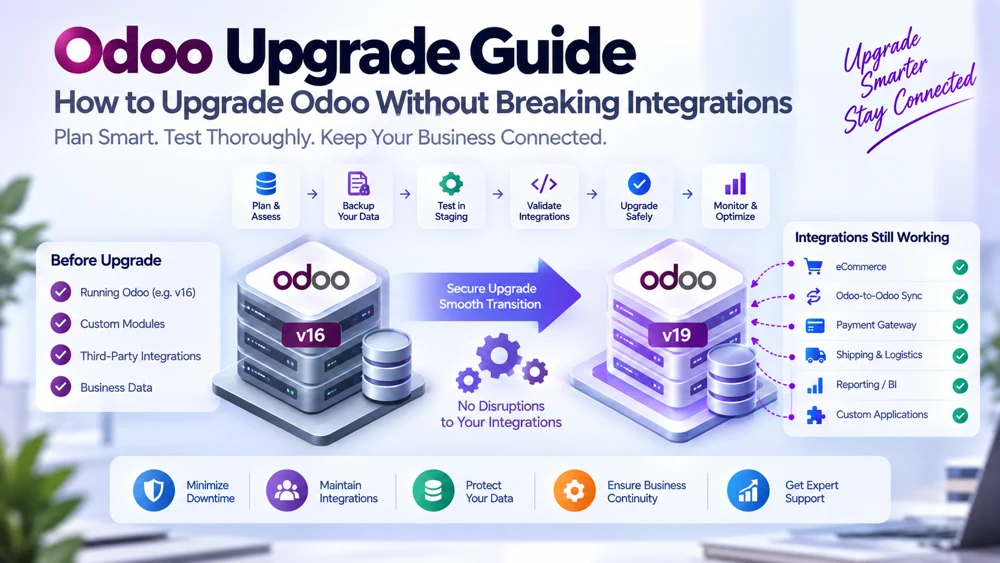
Odoo Upgrade Guide: How to Upgrade Odoo Without Breaking Integrations
Upgrade Odoo carefully whenever your ERP environment depends on APIs, custom modules, third-party applications, or connections between multiple Odoo instances. An Odoo version upgrade can provide new functionality, security improvements, performance enhancements, and reduced technical debt, but it can also affect integrations that depend on models, fields, methods, authentication, custom code, or application behavior from the previous version.
For a basic Odoo environment, upgrading may already require careful testing. For an organization running synchronized Odoo databases, custom applications, eCommerce connections, payment systems, logistics tools, or external APIs, the project becomes much more than a database upgrade.
You must protect the entire connected ecosystem.
Successful Odoo upgrades therefore require preparation before the production database changes. Businesses should review integration dependencies, assess API compatibility, upgrade custom modules, create a reliable database backup, use a staging environment, perform extensive regression testing, validate synchronized records, and confirm that external applications can still communicate correctly with Odoo.
This guide explains how to upgrade Odoo while reducing the risk of breaking integrations and how to verify Odoo integration after upgrade before normal business operations resume.
Why Odoo Upgrades Can Affect Integrations
An integration depends on assumptions.
For example, an external application may assume that Odoo contains:
A particular model
A particular field
A specific field type
A specific API method
A certain workflow
A particular view or server action
A certain authentication method
A particular response structure
An Odoo version upgrade may change one or more of those assumptions.
Even when the core business process still exists, the technical implementation may have changed.
That is why an integration that worked perfectly before an upgrade should not automatically be assumed to work afterward.
What Happens During an Odoo Version Upgrade?
An Odoo version upgrade moves an existing Odoo environment to a newer major version.
Depending on the environment, the process may affect:
Database structures
Standard modules
Custom modules
Models
Fields
Views
Reports
Workflows
JavaScript components
Python code
APIs
Automated actions
Security rules
External integrations
If the implementation contains substantial custom development, additional upgrade work may be required to make that code compatible with the target version.
For organizations operating complex ERP environments, Odoo upgrades should therefore be treated as controlled technical projects rather than routine software updates.
Why Businesses Upgrade Odoo
There are several good reasons to upgrade Odoo.
Access to New Features
New Odoo versions can introduce improved functionality across CRM, sales, accounting, inventory, manufacturing, eCommerce, HR, reporting, and other applications.
Security Improvements
Moving to a supported version can help businesses benefit from current security improvements and platform maintenance.
Better Performance
Newer versions may introduce performance improvements and architectural enhancements.
Reduced Technical Debt
Old customizations may no longer be necessary because newer Odoo versions provide equivalent standard functionality.
Removing unnecessary custom code can make the ERP environment easier to maintain.
Long-Term Supportability
Remaining too long on an outdated implementation can make future upgrades more complicated.
However, these benefits should not come at the expense of broken integrations.
The Biggest Upgrade Risk: Assuming Integrations Will Continue Working
One of the most common upgrade mistakes is testing only the visible Odoo interface.
Users log in.
Sales works.
Inventory works.
Invoices open.
Everything appears fine.
Then an external application begins failing.
The problem is that integration behavior often operates in the background.
An upgrade can affect:
API endpoints
Model names
Field names
Field types
Custom methods
Authentication
Access permissions
Data structures
Validation rules
Automated workflows
Therefore, Odoo integration after upgrade needs its own dedicated testing plan.
Start With an Integration Inventory
Before you upgrade Odoo, create a complete list of systems connected to the ERP.
Do not rely on memory.
Document every integration.
Your inventory may include:
Odoo-to-Odoo synchronization
eCommerce integrations
CRM integrations
Payment gateways
Shipping systems
Warehouse platforms
Accounting software
Banking integrations
Business intelligence tools
Mobile applications
Custom business applications
Government platforms
Supplier portals
Customer portals
Webhooks
Scheduled import/export processes
Middleware
Custom APIs
If an integration is not documented before the upgrade, it can easily be forgotten during testing.
Create an Integration Dependency Map
Once the integrations are listed, document what each one depends on.
For example:
| Integration | Odoo Dependency | Business Impact |
|---|---|---|
| Odoo-to-Odoo Sync | Products, customers, orders | High |
| eCommerce | Products, inventory, sales | Critical |
| Shipping Platform | Delivery orders | High |
| Reporting Tool | Sales and accounting data | Medium |
| Custom CRM | Contacts and opportunities | High |
This dependency map helps prioritize testing.
An integration that controls customer payments deserves more attention than a low-priority nightly reporting export.
Review API Compatibility Before Upgrading
API compatibility should be reviewed before production changes begin.
Ask:
Which Odoo API does the integration use?
Does the target version support it?
Have models changed?
Have methods changed?
Have fields been renamed?
Has authentication changed?
Have permissions changed?
Has the response structure changed?
Does custom API code depend on deprecated functionality?
Do not discover these answers after the production system has already been upgraded.
Odoo API Changes Matter
Odoo's external integration architecture evolves.
An integration built several major versions ago may rely on technical interfaces that newer versions treat differently.
For example, newer Odoo environments include the JSON-2 external API architecture, while older integrations may rely on legacy RPC approaches.
Organizations maintaining long-lived integrations should therefore review the official Odoo external API documentation for the target version rather than assuming the existing integration code remains future-proof.
Check Every Integrated Odoo Model
API compatibility is not only about the transport mechanism.
An integration may depend on specific Odoo models.
Examples include:
res.partnerproduct.templateproduct.productsale.orderpurchase.orderaccount.movestock.picking
Before you upgrade Odoo, review every model used by integrations.
Then identify:
Required fields
Custom fields
Related fields
Selection values
Record rules
Business methods
Computed fields
The integration contract should be compared against the target version.
Review Custom Fields
Custom fields are a major integration dependency.
Imagine an external CRM sends information into:
x_customer_type
If that field is removed, renamed, or redesigned during the upgrade, synchronization may fail.
The same problem can occur when:
Field type changes
Selection values change
Required fields change
Related models change
Company-dependent behavior changes
Document every custom field used by an integration before beginning the Odoo version upgrade.
Custom Modules Are a Major Upgrade Risk
Custom modules extend standard Odoo functionality.
They may also contain:
Integration logic
API controllers
Webhooks
Data mappings
Automated actions
Custom workflows
Scheduled jobs
A module being installable in the new version does not automatically mean that its integration logic still works correctly.
Runtime behavior needs testing.
Audit Custom Modules Before the Upgrade
Create a custom-module inventory.
For every module, document:
Purpose
Business owner
Models modified
Fields added
External systems affected
API controllers
Scheduled jobs
Dependencies
Current developer or support owner
Then classify each module.
Keep
The functionality remains necessary.
Replace
The new Odoo version provides equivalent standard functionality.
Refactor
The functionality is required but the implementation should be improved.
Remove
The customization is no longer necessary.
This process can significantly reduce upgrade complexity.
Avoid Carrying Technical Debt Forward
An Odoo upgrade should not automatically preserve every historical customization.
Suppose a business created a custom feature five years ago because standard Odoo did not support the workflow.
The new version may now provide that feature natively.
Migrating the old customization anyway can create unnecessary maintenance.
Before you upgrade Odoo, challenge old development.
Ask:
Is this still required?
Does standard Odoo now handle it?
Can the workflow be simplified?
Does another customization already duplicate it?
A cleaner target environment means fewer things can break.
Freeze Non-Essential Development
Major upgrades become difficult when developers continue changing the old environment while upgrade work is underway.
New features created during the project may need to be migrated and tested again.
For complex environments, establish a controlled code freeze or minimize non-essential development during the critical upgrade period.
Bug fixes may still be necessary.
The objective is to prevent the upgrade target from constantly moving.
Always Create a Database Backup
A reliable database backup is essential before production upgrade work.
Depending on deployment, this may involve more than the PostgreSQL database itself.
You may also need:
Filestore
Attachments
Configuration
Custom modules
Integration configuration
Environment variables
API credentials
Scheduled-job configuration
Proxy configuration
The backup should represent everything required to reconstruct the business environment.
A Backup Is Useful Only If It Can Be Restored
Creating a backup file does not prove that recovery works.
Where appropriate, test restoration in a non-production environment.
Confirm:
Database restores successfully
Filestore is correct
Custom modules are available
Attachments load
Users can log in
Key business processes work
This turns backup from a checkbox into an actual recovery strategy.
Use a Staging Environment
Never make production the first environment where you discover upgrade problems.
A staging environment provides a controlled place to test the upgraded database.
Ideally, staging should resemble production as closely as practical.
It should include representative:
Database data
Custom modules
Configuration
Integration logic
Security settings
Business workflows
Sensitive production credentials should still be handled carefully.
The objective is to simulate real behavior without putting live operations at risk.
Why Staging Matters for Integrations
An upgraded database may look correct while integrations fail.
Staging allows developers to test:
API requests
Authentication
Webhooks
Data mappings
Product sync
Customer sync
Orders
Inventory updates
Invoice exchange
Error handling
Without staging, these failures appear directly in production.
Do Not Let Staging Accidentally Send Real Transactions
A cloned environment can create risks of its own.
For example, staging might accidentally:
Send customer emails
Create shipping labels
Push orders into production systems
Trigger payment events
Synchronize test records to another live Odoo instance
Protect staging with isolated credentials, disabled outgoing services, safe endpoints, or dedicated test environments.
Testing should imitate production behavior without creating production transactions.
Upgrade Custom Modules Against the Target Version
Every required custom module should be made compatible with the target Odoo version.
Potential problems include:
Removed fields
Renamed models
Changed methods
Modified view structures
Changed JavaScript behavior
New framework patterns
Dependency changes
Deprecated functions
Fixing installation errors is only the first step.
The module must also work correctly with real upgraded data.
Test Custom Modules on a Clean Environment First
A useful approach is to test custom modules against a clean database running the target Odoo version.
This isolates compatibility issues.
You can determine whether the module itself works before introducing the complexities of migrated production data.
Then test the same module against an upgraded copy of the real database.
This two-stage process helps distinguish code problems from data problems.
Upgrade Scripts and Data Changes
Sometimes upgrading custom modules requires changing existing database data.
For example:
A field was renamed
A model changed
An external identifier changed
Data must be recomputed
Old configuration must be corrected
Upgrade scripts can perform these transformations.
They should be tested repeatedly because database modifications can affect integrations.
A record that changes structure may also require a corresponding update in the synchronization mapping.
Check Integration Mappings After Every Schema Change
Suppose an integration previously mapped:
Source:
customer_category
Destination:
x_customer_type
The upgraded version replaces x_customer_type with another structure.
The Odoo environment may function correctly for users, but the integration mapping is now invalid.
Therefore, every upgrade-related schema change should trigger an integration mapping review.
Review Authentication
An Odoo version upgrade is an ideal time to review API security.
Check:
Integration users
API keys
Access rights
Record rules
Company permissions
Credential storage
Expired credentials
Unused accounts
Do not automatically give integrations administrator privileges just to make post-upgrade testing easier.
Maintain minimum necessary access.
Check Scheduled Jobs
Integrations frequently depend on automated jobs.
These may:
Export data
Import records
Retry failed transactions
Synchronize inventory
Refresh prices
Process queues
After the upgrade, confirm that scheduled jobs:
Still exist
Are enabled
Run at the expected time
Use valid code
Complete successfully
Do not create duplicates
A disabled or failing scheduled job can make an integration appear healthy initially while synchronization silently stops.
Review Webhooks and Callback URLs
If external applications send events into Odoo, check every callback.
Confirm:
URL is still correct
Controller exists
Authentication still works
Payload validation succeeds
Response codes are correct
Similarly, confirm outbound Odoo webhooks still reach their destinations.
What Is Regression Testing?
Regression testing verifies that functionality that worked before the upgrade still works afterward.
This is essential for integration-heavy environments.
A developer should not test only what changed.
They should also test what was supposed to remain unchanged.
Build an Integration Regression Test Matrix
Create a matrix covering every critical data flow.
For example:
| Test | Expected Result |
|---|---|
| Create customer in Odoo A | Customer appears in Odoo B |
| Update product price | Correct price synchronizes |
| Create sales order | Order reaches destination |
| Change inventory | Quantity updates correctly |
| Invalid record | Error is logged |
| Network interruption | Retry occurs safely |
| Duplicate request | No duplicate transaction |
| Expired credentials | Integration fails visibly |
This becomes the acceptance checklist for Odoo integration after upgrade.
Test More Than Successful Transactions
Many upgrade teams test only happy paths.
For example:
“Create one customer and confirm it synchronizes.”
That is not enough.
Test:
Missing fields
Invalid mappings
Duplicate records
Permission failures
Network problems
Timeout behavior
Conflicting updates
Failed dependencies
Retry logic
A production integration must survive problems as well as successful transactions.
Test Bi-Directional Synchronization Carefully
If two Odoo environments synchronize in both directions, upgrades create additional risk.
Test:
Instance A → Instance B
and separately:
Instance B → Instance A
Confirm:
Matching works
Field ownership is preserved
Synchronization loops do not occur
Conflict rules still work
Custom fields remain compatible
Do not assume successful one-direction testing proves the reverse direction works.
Test Record Matching
Integration often depends on:
External IDs
SKUs
Customer references
Tax numbers
Integration UUIDs
Stored record mappings
Upgrades must preserve these identifiers.
If IDs or mappings change unexpectedly, integrations may begin creating duplicate records instead of updating existing ones.
Validate Data Integrity After Upgrade
An integration can technically run while still sending incorrect information.
That is why data integrity checks are necessary.
Compare important records before and after the upgrade.
Examples:
Number of products
Active customers
Open sales orders
Inventory quantities
Pending invoices
Integration mapping records
Failed synchronization queues
The objective is not merely to prove that data exists.
It must also remain correct.
Test API Performance
An upgrade may change performance characteristics.
Integration jobs that previously completed in five minutes might now take much longer.
Measure:
Request duration
Synchronization throughput
Queue size
Worker performance
Database load
Error rate
Performance problems may not appear during small manual tests.
Use realistic transaction volumes where possible.
Test Rate and Concurrency Behavior
If several workers or systems make API requests simultaneously, test concurrent behavior.
Look for:
Locks
Timeouts
Duplicate processing
Transaction conflicts
Excessive retries
Large integrations should not be tested only with one request at a time.
Create a Production Upgrade Checklist
Before approving production deployment, verify that:
Backup is complete
Restore procedure is understood
Staging upgrade succeeded
Required custom modules work
Integration APIs pass
Scheduled jobs pass
Authentication passes
Critical workflows pass
Data integrity checks pass
Performance is acceptable
Business users approve key workflows
Monitoring is ready
Support team knows the deployment plan
If several critical items remain uncertain, production should not become the test environment.
Rehearse the Upgrade
A rehearsal means running the upgrade process using a recent production copy before the actual production event.
Record:
Upgrade duration
Manual steps
Migration script duration
Custom-module issues
Integration configuration changes
Validation time
A rehearsal helps reveal issues that theoretical planning cannot.
It also creates a realistic production runbook.
Document the Upgrade Runbook
A good runbook states exactly what should happen.
For example:
Announce maintenance window
Pause selected integrations
Stop critical scheduled jobs
Create final database backup
Upgrade database
Deploy updated custom modules
Run upgrade scripts
Validate database
Configure integration credentials
Test API connectivity
Run smoke tests
Run data sync tests
Re-enable jobs
Monitor synchronization
Confirm user access
Clear documentation reduces confusion during the production change.
Pause Integrations During the Upgrade When Necessary
Imagine another Odoo instance keeps sending orders while the target database is being upgraded.
Those requests could:
Fail
Queue incorrectly
Be lost
Be processed twice later
Where appropriate, integrations should be safely paused before the production transition.
After the upgrade, resume them in a controlled manner.
Protect Transactions Created During Downtime
If external systems continue receiving business activity while Odoo is unavailable, define what happens to those transactions.
Possible approaches include:
Queuing
Temporary storage
Controlled retries
Pausing upstream operations
Scheduled replay
No important transaction should disappear simply because the ERP was in maintenance.
Upgrade Production Only After Staging Passes
The staging environment should successfully complete both ERP and integration tests before production upgrade begins.
Production should not be used to discover whether:
Custom modules install
APIs work
Mappings exist
Authentication succeeds
Workflows remain compatible
Those questions should already have answers.
Smoke Testing Immediately After Upgrade
Once production becomes available, perform a focused set of tests before fully reopening the environment.
Check:
Login
Core modules
Customer creation
Product lookup
Sales order
Invoice
Inventory
API authentication
One test synchronization
Scheduled jobs
Error logs
This confirms basic system health.
Full Post-Upgrade Integration Testing
After smoke testing, validate the complete integration matrix.
For example:
Customer Synchronization
Create and update representative customers.
Product Synchronization
Verify SKUs, categories, prices, and mapped fields.
Sales Orders
Check products, customers, currencies, taxes, and totals.
Inventory
Confirm stock synchronization remains accurate.
Financial Documents
Test invoice or payment flows if part of the integration.
Errors
Deliberately trigger at least one controlled failure to ensure error logging and alerts still work.
Monitor Odoo Integration After Upgrade
Do not consider the project finished the moment tests pass.
The first production hours and days can expose edge cases that staging did not reveal.
Monitor:
API errors
Failed synchronization jobs
Queue length
Processing delays
Duplicate records
Authentication failures
Mapping errors
Database performance
Compare these metrics with pre-upgrade behavior where possible.
Watch for Silent Failures
The most dangerous integration failure is not always a visible error.
Sometimes an integration simply stops processing.
Users may not notice until days later.
Create monitoring that can identify situations such as:
No successful sync for a defined period
Queue continuously growing
Error rate increasing
Scheduled job not running
API latency becoming abnormal
This helps detect issues before they create major discrepancies.
Keep Upgrade and Integration Logs
Logs should help technical teams understand:
Which records were processed
When they were processed
Source and destination
Request result
Error details
Retry attempts
Detailed logging becomes particularly valuable after an Odoo version upgrade because it makes comparisons easier.
Common Reasons Integrations Break After an Odoo Upgrade
Renamed or Removed Fields
The integration still references the previous field.
Changed Models
Data moved or models were redesigned.
Changed Methods
Custom code relies on a method that no longer behaves the same way.
Access Rights Changes
The integration user loses required permissions.
Custom Module Failure
Integration-specific code is not compatible.
Mapping Problems
Data structures changed but transformations were not updated.
Authentication Changes
The previous connection method no longer behaves as expected.
Disabled Scheduled Jobs
Background synchronization stops running.
Custom Controllers
A custom API route fails under the new codebase.
Third-Party Connector Incompatibility
A connector supports the previous Odoo version but not the new one.
How to Fix a Broken Integration After Upgrade
Start by identifying where the failure occurs.
Ask:
Can the external system reach Odoo?
Does authentication succeed?
Does the integration user have access?
Does the model exist?
Does the field exist?
Does the mapping remain valid?
Does the method work?
Is the request valid?
Is the destination record matched?
What does the log show?
Work through the integration layer systematically instead of immediately rewriting the entire connector.
When to Roll Back
A rollback decision should be based on business impact.
Critical problems may include:
Orders cannot enter the ERP
Financial transactions fail
Major data corruption
Inventory becomes unreliable
Multiple critical integrations stop working
However, rollback feasibility depends heavily on the hosting and upgrade approach being used.
That is another reason backups, rehearsals, and a clearly defined recovery strategy are essential before the production change.
Avoid Upgrading Too Many Things at Once
A major Odoo upgrade is already a significant change.
Avoid combining it unnecessarily with:
Complete integration redesign
Major business process changes
Large new feature launches
Infrastructure migration
Significant master-data restructuring
Sometimes these changes must happen together, but combining unrelated changes increases troubleshooting difficulty.
When something fails, the team may struggle to identify the cause.
Upgrade Integrations Deliberately
Integrations themselves may benefit from modernization during an Odoo upgrade.
For example, the project may provide an opportunity to:
Remove deprecated API calls
Improve authentication
Clean data mappings
Improve logging
Add retries
Introduce queues
Add automated tests
Reduce hard-coded logic
This makes Odoo integration after upgrade more maintainable than simply reproducing the previous implementation.
Build Automated Integration Tests
If an integration is business-critical, automated tests can greatly improve future upgrades.
Tests might verify:
Authentication
Customer synchronization
Product mapping
Order creation
Update behavior
Error handling
Duplicate prevention
Instead of relying entirely on manual testing during every future upgrade, teams can execute a repeatable test suite.
Odoo Upgrade Testing for Multiple Odoo Instances
Organizations running Odoo-to-Odoo synchronization have additional responsibilities.
Consider:
Odoo A ↔ Odoo B
If only Odoo A is being upgraded, the integration must temporarily support:
New Odoo A ↔ Existing Odoo B
That compatibility should be tested.
If both instances are being upgraded, decide whether upgrades happen:
At the same time
One after another
Each strategy introduces different risks.
Sequential Odoo Instance Upgrades
Upgrading one environment first creates a temporary mixed-version architecture.
For example:
Odoo 19 ↔ Odoo 18
The integration must support that combination during transition.
Test it before production.
Simultaneous Odoo Instance Upgrades
Upgrading both instances within the same maintenance window may eliminate prolonged mixed-version operation.
However, it increases the number of moving parts in one change event.
Choose the approach based on integration architecture, downtime requirements, testing capacity, and rollback options.
Protect Shared Master Data
Odoo-to-Odoo integrations often synchronize master records such as:
Products
Customers
Vendors
Categories
Prices
After an upgrade, verify that data ownership remains unchanged.
The upgrade should not accidentally cause one instance to overwrite data it previously only consumed.
Odoo Upgrade Services vs Internal Upgrade Teams
Some organizations manage the entire upgrade internally.
Others use Odoo upgrade services because they have:
Extensive custom modules
Multiple integrations
Several Odoo databases
Limited internal Odoo expertise
Critical uptime requirements
The right choice depends on internal capability and project complexity.
Regardless of who performs the upgrade, the integration inventory and acceptance criteria should belong to the organization.
How to Evaluate Odoo Upgrade Services
Before selecting Odoo upgrade services, ask whether the provider will test:
Custom modules
APIs
External systems
Scheduled jobs
Odoo-to-Odoo synchronization
Data integrity
Authentication
Performance
Regression scenarios
A provider who focuses only on whether the upgraded database starts successfully may not be sufficient for an integration-heavy business.
How Odoo Integration Services Support Upgrades
Businesses with complex integrations need to treat synchronization as part of the upgrade scope.
Altapete Solutions provides Odoo Integration Services for organizations operating connected Odoo environments.
For Odoo-to-Odoo architectures, integration maintenance may include reviewing:
Multi-instance synchronization
API connectivity
Field mapping
Custom transformations
Validation rules
Conflict resolution
Error handling
Data integrity
Multi-company workflows
These areas should be validated after an Odoo version upgrade to confirm that connected ERP environments still exchange information correctly.
Odoo Upgrade Checklist
Before you upgrade Odoo, confirm the following:
Current Odoo version documented
Target version confirmed
Integration inventory complete
Custom-module inventory complete
API dependencies documented
External systems documented
Data mappings documented
Backup created
Backup recovery approach understood
Staging environment prepared
Custom modules upgraded
Upgrade scripts tested
APIs tested
Authentication tested
Regression testing completed
Business workflows tested
Integration performance tested
Production runbook prepared
Monitoring prepared
Support team available
The more complex the environment, the more valuable this checklist becomes.
Final Thoughts
To upgrade Odoo safely, businesses should think beyond the database itself.
Modern ERP environments are connected ecosystems.
Odoo may communicate with other Odoo instances, eCommerce systems, logistics platforms, financial software, reporting systems, custom applications, and external APIs.
An upgrade can affect any connection that depends on models, fields, methods, permissions, authentication, or custom code.
That is why safe Odoo upgrades require a structured process.
Start by documenting integrations.
Review API compatibility.
Audit custom modules.
Create a reliable database backup.
Use a realistic staging environment.
Perform extensive regression testing.
Rehearse the upgrade.
Then validate Odoo integration after upgrade before allowing normal business activity to resume.
A successful upgrade should not merely result in a newer Odoo version.
It should result in a newer Odoo environment where customers still synchronize, products still map correctly, orders still reach the right systems, integrations remain secure, and connected business workflows continue operating without disruption.
Frequently Asked Questions About Upgrading Odoo
1. How do I upgrade Odoo without breaking integrations?
To upgrade Odoo safely, document all integrations, check API and model compatibility, upgrade custom modules, create a database backup, test in a staging environment, perform regression testing, and validate every critical integration before and after production deployment.
2. Can an Odoo version upgrade break API integrations?
Yes. An Odoo version upgrade can affect models, fields, methods, permissions, authentication, custom modules, or other behaviors that integrations depend on. API compatibility should therefore be tested against the target version before production deployment.
3. Should I back up Odoo before upgrading?
Yes. A reliable database backup and associated filestore or configuration backups should be part of the upgrade preparation. Recovery procedures should also be understood before production changes begin.
4. Why should I use a staging environment for an Odoo upgrade?
A staging environment allows the upgraded database, custom modules, workflows, APIs, and integrations to be tested without risking live operations. Production should not be the first place where compatibility problems are discovered.
5. What happens to custom modules during an Odoo upgrade?
Custom modules may require code changes because newer Odoo versions can modify models, fields, methods, views, JavaScript frameworks, dependencies, or workflows. Required custom modules should be adapted and thoroughly tested before production deployment.
6. What is regression testing in an Odoo upgrade?
Regression testing confirms that existing functionality still behaves correctly after the upgrade. For integration-heavy environments, it should include customers, products, orders, inventory, APIs, authentication, scheduled jobs, data mapping, error handling, and external applications.
7. How do I test Odoo integration after an upgrade?
Test Odoo integration after upgrade by verifying authentication, API connectivity, record creation, updates, mapping, duplicate prevention, validation, error handling, retries, scheduled jobs, bi-directional synchronization, and performance.
8. Can two connected Odoo instances run different versions?
They can in some architectures, but compatibility depends on the integration design. If one instance is upgraded first, the integration should be tested against the temporary mixed-version environment before production deployment.
9. Do Odoo integrations need changes after every upgrade?
Not necessarily. Some integrations may continue working with minimal changes, while others require updates because of changed fields, models, APIs, custom modules, or workflows. Testing is necessary to determine the actual impact.
10. When should I use Odoo upgrade services?
Odoo upgrade services can be useful when your environment contains extensive custom modules, multiple integrations, separate Odoo databases, complex business workflows, or limited internal upgrade expertise. The provider should test integrations as well as the upgraded ERP itself.