
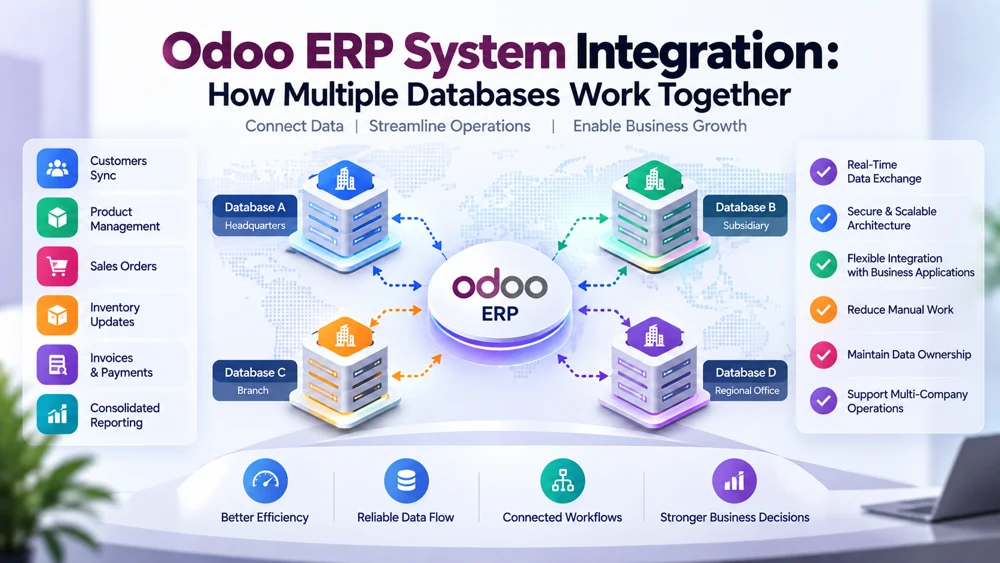
Odoo ERP System Integration: How Multiple Databases Work Together
Odoo ERP system integration allows businesses to connect separate ERP databases so important information can move between companies, departments, branches, subsidiaries, or independent Odoo environments without relying on constant manual data entry. A properly connected Odoo ERP software environment can exchange customer records, products, sales orders, inventory information, invoices, and other operational data while allowing each database to maintain the processes and configurations it needs.
Modern organizations rarely remain simple forever. A company may begin with one database and later open another branch, acquire a business, create separate legal entities, expand internationally, or introduce a new ERP environment for a specialized operation.
At that point, the challenge changes.
The organization no longer needs only an ERP system. It needs multiple systems to work together.
A connected Odoo ERP system architecture can help separate databases exchange approved information while maintaining security, data ownership, validation, and operational control.
However, connecting databases successfully requires more than transferring records from one location to another. Businesses need to understand ERP database architecture, data exchange, integration rules, record mapping, synchronization frequency, error handling, and the relationship between different business applications.
This guide explains how multiple Odoo databases can work together, what integration architecture looks like, which records can be exchanged, and when separate ERP environments make more sense than placing everything inside one database.
What Is an Odoo ERP System?
An Odoo ERP system is a business management environment that can bring multiple operational functions into a connected platform.
Organizations may use Odoo for areas such as:
Sales
CRM
Inventory
Purchasing
Accounting
Manufacturing
Project management
Human resources
eCommerce
Website management
Field operations
Service management
Instead of operating completely isolated applications, businesses can manage multiple workflows within a broader ERP ecosystem.
For smaller businesses, one database may be enough.
Larger organizations can become more complex.
They may operate several databases, multiple companies, separate Odoo instances, external software applications, or a combination of all of these.
That is where Odoo ERP system integration becomes important.
What Does ERP System Integration Mean?
ERP integration means connecting an ERP platform with another database, ERP environment, application, or service so they can exchange information.
In an Odoo environment, integration might connect:
Odoo database A with Odoo database B
Odoo with another ERP
Odoo with eCommerce software
Odoo with logistics platforms
Odoo with CRM software
Odoo with accounting systems
Odoo with custom applications
Odoo with reporting platforms
Odoo with payment systems
When multiple Odoo databases are involved, the integration needs to determine how corresponding records are identified and how changes move between the environments.
The goal is to create reliable connected workflows rather than forcing employees to manually act as the bridge between systems.
Why Would a Business Have Multiple Odoo Databases?
If one Odoo ERP system can manage many business functions, why would a company need multiple databases?
There are several valid reasons.
Separate Legal Entities
A business group may contain several independent legal companies.
Each entity may require its own accounting structure, workflows, users, permissions, reporting, and operational controls.
International Operations
A company operating in different countries may need separate configurations because of local taxation, accounting practices, currencies, business processes, or regulatory requirements.
Mergers and Acquisitions
A newly acquired company may already operate its own erp system Odoo environment.
Immediately migrating everything into the parent company's database could create unnecessary operational risk.
Integration can provide a temporary or long-term bridge.
Independent Business Units
Some organizations operate business divisions with very different processes.
A manufacturing subsidiary may have completely different workflows from a professional services company within the same corporate group.
Different Odoo Versions
Organizations do not always upgrade every database at the same time.
Different business units may therefore operate different versions of ERP software Odoo environments.
Different Customizations
One database may contain custom modules, fields, workflows, or integrations that another company does not need.
Maintaining separate environments can preserve those customizations while still allowing essential information to move between the systems.
One Odoo Database vs Multiple Databases
Before investing in integration, a business should determine whether separate databases are actually necessary.
Odoo supports multi-company configurations within a single database.
This can work well when business entities can share infrastructure and operate with compatible processes.
Multiple databases may make more sense when organizations require stronger technical separation.
The decision should consider:
Legal structure
Security requirements
Customizations
Odoo versions
Infrastructure
Data ownership
Local compliance
Operational independence
Reporting requirements
Integration complexity
The right architecture depends on the organization rather than a universal rule.
How Multiple Odoo Databases Work Together
At a high level, multiple databases work together through controlled data exchange.
Consider two environments:
Odoo Database A → Integration Layer → Odoo Database B
The integration layer acts as an intermediary.
It determines:
What information should be transferred
When information should be transferred
Where the information should go
How fields should be mapped
Whether the receiving system already has the record
Whether the data is valid
What happens when the transaction fails
This layer is what turns independent systems into a connected Odoo ERP system environment.
Example of Multiple Odoo Databases
Imagine a business group with a headquarters database and a regional subsidiary.
Headquarters manages:
Product master data
Supplier information
Central procurement
Corporate reporting
The subsidiary manages:
Local customers
Local inventory
Regional sales
Local accounting
The organization does not want both databases to contain completely independent product catalogs.
Instead, products created at headquarters can synchronize to the regional database.
The subsidiary can then use those approved products for local sales.
At the same time, regional sales information may flow back to headquarters for reporting.
Both databases remain independent, but selected processes become connected.
That is the basic purpose of Odoo ERP system integration.
Understanding ERP Database Architecture
An ERP database stores structured business records and the relationships between those records.
A customer may be connected to:
Sales orders
Invoices
Payments
Deliveries
Opportunities
Contacts
A product may be connected to:
Inventory
Purchase orders
Sales orders
Suppliers
Warehouses
Pricing
Manufacturing operations
This means integration cannot always transfer one isolated record.
The system often needs to understand dependencies.
A sales order may not be useful in the destination database unless the customer and products already exist there.
Reliable Odoo ERP system architecture therefore needs to manage relationships as well as individual fields.
What Data Can Be Exchanged Between Odoo Databases?
The exact data depends on business requirements.
Common examples include:
Customers
Customer records can be synchronized across databases when different companies need shared customer information.
Vendors
Supplier information may be centrally maintained and distributed to subsidiaries.
Products
Product names, SKUs, categories, descriptions, units, and selected pricing information can be exchanged.
Sales Orders
Sales transactions may move between companies or into a centralized reporting environment.
Purchase Orders
Procurement information may be shared when one company purchases goods or services on behalf of another.
Inventory
Selected inventory information may be synchronized for planning or availability purposes.
Invoices
Financial documents can be exchanged when business and accounting rules require it.
Payments
Certain payment statuses or references may need to flow between systems.
Master Data
Core records may be centrally controlled and distributed across multiple databases.
These are only examples.
A good integration should synchronize data because there is a business reason to do so, not simply because the field exists.
The Importance of Data Ownership
One of the most important questions in Odoo ERP system integration is:
Which database owns the information?
Suppose Product A exists in three databases.
If every database is allowed to change the product name, category, SKU, and price independently, conflicts can quickly appear.
A better approach may define:
Headquarters owns:
SKU
Product name
Global category
Regional database owns:
Local price
Local sales description
Regional stock
This creates clear responsibility.
Data ownership helps connected ERP environments avoid competing updates.
What Is a Source of Truth?
A source of truth is the system considered authoritative for a specific type of data.
For example:
| Data | Primary Source |
|---|---|
| Product master | Headquarters Odoo |
| Local customers | Regional Odoo |
| Corporate vendors | Headquarters Odoo |
| Regional inventory | Regional Odoo |
| Global reporting | Central reporting environment |
Defining the source of truth makes data exchange more predictable.
Without it, multiple systems may contain different versions of the same information.
How Odoo Database Synchronization Works
A typical synchronization process may follow these steps:
A record changes in the source database.
The integration identifies the change.
The data is extracted.
Required fields are validated.
The corresponding destination record is identified.
Data transformation is applied if necessary.
The destination is updated.
The result is logged.
Failed transactions are handled.
The process can operate in one direction or both directions.
One-Way Data Exchange
One-way synchronization sends information from one Odoo ERP system database to another.
Example:
Headquarters → Subsidiary
Headquarters creates products.
Subsidiaries receive those products but cannot send product-master changes back.
This model is often easier to control because record ownership is clear.
One-way synchronization works especially well for centrally managed master data.
Bi-Directional Data Exchange
Bi-directional integration allows information to move in both directions.
Example:
Odoo Database A ↔ Odoo Database B
A customer created in either system might be shared with the other.
This approach provides more flexibility, but it also introduces more complexity.
If both databases modify the same field, the integration needs conflict-resolution rules.
Record Matching Between ERP Databases
One of the biggest integration challenges is identifying the same record across multiple environments.
Suppose:
Database A customer ID = 325
Database B customer ID = 891
These IDs may represent the same customer.
The integration therefore needs another way to connect them.
Possible identifiers include:
External IDs
Integration IDs
Product SKU
Customer reference
Tax number
Barcode
Email address
Dedicated mapping records
Strong record matching prevents duplicate records and incorrect updates.
Why Internal Database IDs Should Be Handled Carefully
Internal IDs are typically meaningful inside their own database.
An internal record ID from one Odoo ERP system should not automatically be assumed to represent the same object in another independent database.
The integration may instead maintain a mapping.
For example:
Database A Product 455 → Integration ID PX1007 → Database B Product 982
Future updates can use that mapping to locate the correct record.
This is particularly useful in complex erp systems Odoo environments.
Data Mapping Between Odoo Systems
Even two Odoo databases may not use identical fields.
One system may contain custom fields.
Another may use different selection values.
For example:
Database A:
Customer Type = Enterprise
Database B:
Customer Segment = Corporate
The integration may need to convert Enterprise into Corporate before sending the record.
This is known as data mapping or transformation.
Mapping can involve:
Field names
Categories
Status values
Currencies
Units
Tax references
Warehouses
Company identifiers
Custom fields
Strong mapping is essential for accurate Odoo ERP system integration.
Data Validation Before Synchronization
Data should be checked before it enters another ERP database.
Suppose a sales order is being transferred.
The integration may verify:
Customer exists
Product exists
Currency is valid
Required fields are present
Company mapping is correct
Quantity is valid
Tax references exist
Destination workflow allows the transaction
If important information is missing, the integration should not blindly create an incomplete record.
Validation protects data quality across connected environments.
Real-Time vs Scheduled Synchronization
Not all connected workflows need the same synchronization speed.
Real-Time or Near-Real-Time Exchange
This may be useful for:
Sales orders
Inventory availability
Critical customer updates
Operational transactions
Scheduled Exchange
This may be sufficient for:
Historical information
Management reporting
Non-critical master data
Periodic reconciliation
The best architecture may combine both methods.
Critical information can move quickly while lower-priority information is processed periodically.
How APIs Connect Odoo Databases
APIs provide a structured way for software applications to communicate.
An integration can use supported Odoo interfaces to read approved information and perform permitted operations in another environment.
Businesses and developers planning current integrations should review the official Odoo External API documentation when selecting an API architecture, because supported interfaces and technical requirements can vary by Odoo version.
API integration still requires careful decisions around:
Authentication
Permissions
Data mapping
Validation
Transaction sequencing
Rate and performance considerations
Error handling
Monitoring
The API is the communication mechanism.
It does not replace the need for good integration architecture.
Connecting Odoo with Business Applications
Multiple databases are only one part of an enterprise technology environment.
The Odoo ERP system may also need to communicate with other business applications.
These can include:
CRM platforms
eCommerce systems
Logistics applications
Payment gateways
Business intelligence platforms
HR software
Warehouse systems
Custom applications
Government platforms
Supplier portals
A growing organization may therefore have a wider integration ecosystem rather than only two databases.
Connected Workflows Across Applications
Connected workflows allow information to move through several systems without requiring employees to manually recreate each transaction.
For example:
An online order may begin in an eCommerce platform.
The order enters Odoo.
Odoo updates inventory.
A logistics platform receives fulfillment information.
Tracking information returns to the ERP.
The customer receives an updated order status.
Each application handles a specific responsibility, but integration makes the workflow feel connected.
The same architectural principles apply when multiple Odoo databases participate in the process.
Example: Product Master Synchronization
Consider a company operating three regional databases.
Headquarters controls product master data.
A new product is created centrally.
The synchronization process may:
Detect the new product.
Verify required information.
Assign an integration identifier.
Determine which regional databases should receive it.
Map categories and fields.
Create corresponding product records.
Record destination IDs.
Log successful synchronization.
Later, headquarters changes the product name.
The integration uses stored mappings to update the appropriate records.
This is more reliable than searching for products by name each time.
Example: Customer Synchronization
A regional office creates a new enterprise customer.
Headquarters requires the customer for centralized reporting.
The integration can:
Detect the customer.
Validate required fields.
Search for an existing match.
Create the record centrally when appropriate.
Store the database relationship.
Record synchronization status.
If the customer already exists centrally, the system may update selected fields instead.
The exact rules depend on record ownership.
Example: Sales Order Exchange
A branch may create a sales order that another entity needs for fulfillment.
The destination Odoo ERP system may need the order, but several related records must already exist.
The integration should confirm:
Customer mapping
Product mapping
Currency
Warehouse
Tax rules
Company
Pricing information
Only after those dependencies are resolved should the order be created.
This is why ERP integration is more complex than simply copying tables between databases.
Example: Inventory Data Exchange
Suppose a business operates several warehouses under separate Odoo environments.
Headquarters wants group-wide inventory visibility.
The organization may not need headquarters to control every stock movement.
Instead, each regional ERP database can remain responsible for its own stock while periodically sending selected inventory information to a central environment.
This enables reporting without removing local control.
Error Handling in Multiple Database Integration
No integration operates perfectly forever.
Transactions may fail because of:
Network problems
API errors
Invalid credentials
Missing data
Validation failures
Unknown products
Duplicate records
Permission issues
Database downtime
Custom module changes
Reliable Odoo ERP system integration should make these failures visible.
Temporary vs Permanent Errors
Not every failure should be handled the same way.
Temporary Error
A short network interruption may succeed when retried.
Data Error
A missing product cannot usually be solved by repeating the same transaction.
The data must first be corrected.
Authentication Error
Expired or invalid credentials may require administrator action.
Business Rule Error
The destination database may reject a record because the transaction is not allowed under its configuration.
Different error categories need different recovery rules.
Retry Logic
Retry logic allows temporary failures to be processed again.
Suppose 2,000 records are synchronizing and one connection fails briefly.
A good integration should not necessarily restart the entire operation.
Failed transactions can be queued and retried according to defined rules.
This improves reliability and reduces unnecessary processing.
Integration Logging
Logs make it possible to understand what happened during synchronization.
A useful log may include:
Source system
Source record
Destination system
Destination record
Operation
Timestamp
Success status
Error details
Retry status
Without logs, administrators may not know why two erp systems Odoo environments contain different data.
Preventing Duplicate Data
Duplicates can appear when matching logic is weak.
For example, one database may contain:
Global Trading LLC
while another contains:
Global Trading
If the integration uses company name alone, it might create an unnecessary duplicate.
Dedicated identifiers and well-defined matching rules can improve accuracy.
Data quality should also be reviewed before large synchronization projects begin.
Integration can spread bad data just as efficiently as good data.
Preventing Synchronization Loops
Bi-directional integration can accidentally create loops.
Imagine:
Database A updates a customer.
The change is sent to Database B.
Database B records the update.
The integration interprets it as a new change.
It sends the same information back to Database A.
The process repeats.
A well-designed Odoo ERP system integration should identify changes created by synchronization so they are not repeatedly sent back.
Common approaches can involve synchronization metadata, external IDs, timestamps, origin markers, or workflow-specific logic.
Security in ERP Database Integration
ERP systems often contain sensitive information.
Connected databases may expose:
Customer information
Supplier records
Financial data
Pricing
Inventory
Employee information
Business transactions
Integration security therefore matters.
Important practices include:
Dedicated integration users
Minimum necessary permissions
Secure API credentials
Encrypted communication
Credential rotation
Access logs
Data validation
Controlled error messages
Integration should not receive broad administrative privileges unless there is a genuine technical requirement.
Different Odoo Versions and Integration
An organization may operate multiple Odoo ERP software versions.
This can happen after acquisitions, gradual upgrades, or decentralized IT management.
Different versions may use different models, fields, methods, or API approaches.
Integration architecture should therefore be designed according to the versions actually being connected.
Businesses should not assume that an integration built for one version will remain unchanged forever.
Upgrade planning should include integration testing.
Custom Modules and Multiple Databases
Custom modules create additional considerations.
Suppose Database A has:
x_customer_priority
but Database B does not.
The integration needs to decide whether:
The field is ignored
A corresponding field is created
The value is transformed
The data is stored elsewhere
This is why understanding both databases is essential before building Odoo ERP system integration.
Performance Considerations
Large organizations may process thousands or millions of records.
Sending every update individually without considering performance can create unnecessary load.
Integration architecture may need:
Queues
Batch processing
Pagination
Selective synchronization
Scheduled jobs
Incremental updates
Efficient queries
Failure isolation
The best design depends on transaction volume and how quickly information needs to move.
Why You Should Not Synchronize Everything
A common mistake is attempting to copy every record between databases.
That increases:
Processing volume
Conflict risk
Storage
Complexity
Troubleshooting effort
Security exposure
Instead, organizations should ask:
“What information does the receiving system actually need?”
A successful Odoo ERP system integration moves the right data, not necessarily all data.
Integration vs Database Consolidation
Sometimes integration is the right solution.
Sometimes consolidation is better.
If two environments use nearly identical processes and have no strong reason to remain separate, maintaining multiple databases may create unnecessary complexity.
Consolidation might reduce:
Infrastructure
Duplicate configuration
Integration requirements
Maintenance
Data inconsistency
However, separate databases may remain appropriate where strong operational, legal, technical, or security separation is required.
Integration should therefore follow architecture decisions rather than replace them.
When Multiple Odoo Databases Make Sense
Multiple environments can make sense when:
Legal entities need stronger separation
Regions operate independently
Odoo versions differ
Customizations are incompatible
Businesses were acquired separately
Infrastructure needs differ
Compliance requirements require isolation
A staged migration is underway
In those situations, Odoo ERP system integration can connect the systems without removing their independence.
When One Odoo Database May Be Better
A single database may be better when:
Companies have similar workflows
Shared data is extensive
Central administration is desirable
Customizations are compatible
Security can be handled through company-level controls
Integration complexity would exceed the benefits of separation
Architecture should always begin with business requirements.
Planning an Odoo ERP Integration Project
A structured integration project should begin before any code is written.
Step 1: Identify Every System
Document all Odoo databases and connected business applications.
Include:
Odoo version
Company
Hosting model
Custom modules
External integrations
Step 2: Identify Data Requirements
Determine what information needs to move.
Do not start by asking what can be integrated.
Start by asking what the business actually needs.
Step 3: Define Ownership
Identify the source of truth for each important data type.
Step 4: Define Synchronization Direction
Decide whether information flows:
One way
Both ways
Selectively by field or transaction
Step 5: Define Record Matching
Determine how the same customer, product, vendor, or transaction will be identified across databases.
Step 6: Define Mapping Rules
Document differences between fields, categories, statuses, currencies, and custom structures.
Step 7: Define Validation
Specify what makes a record acceptable to the destination system.
Step 8: Define Failure Handling
Determine which errors can be retried and which require human intervention.
Step 9: Test Real Workflows
Test actual business scenarios rather than only simple technical connections.
Step 10: Monitor the Integration
Integration should be monitored after deployment as systems and business processes change.
Testing Multiple Odoo Database Integration
Testing should include successful and unsuccessful scenarios.
Important tests include:
Record Creation
Confirm new records appear correctly.
Record Updates
Verify only approved fields change.
Duplicate Prevention
Send the same information twice and confirm duplicates are not created.
Missing Dependencies
Attempt to synchronize an order whose product or customer is unavailable.
Invalid Data
Confirm the integration rejects or isolates incorrect records.
Connection Failure
Simulate temporary outages.
Permission Failure
Ensure the integration cannot exceed its allowed access.
High-Volume Processing
Test realistic transaction loads.
A production-ready Odoo ERP system integration should be designed for problems as well as successful transactions.
Common Odoo ERP Integration Mistakes
No Source of Truth
If multiple databases control the same information without rules, conflicts become unavoidable.
Weak Record Matching
Matching by names alone can create duplicates or incorrect updates.
Integrating Before Cleaning Data
Integration does not automatically fix inconsistent data.
Synchronizing Too Much
Moving unnecessary records increases complexity.
No Error Monitoring
Silent failures can leave databases inconsistent.
Ignoring Future Upgrades
Odoo versions, custom modules, and APIs can evolve.
Assuming Both Databases Are Identical
Two erp system Odoo environments often develop significant structural differences over time.
Odoo ERP Integration for Growing Businesses
Growth often creates system fragmentation.
A company begins with one database.
Later, it may gain:
New companies
Regional branches
Acquisitions
New applications
Additional warehouses
eCommerce channels
Custom platforms
If every new environment operates independently, employees eventually spend significant time moving information manually.
Integration provides a path toward coordinated growth.
A connected architecture allows businesses to keep specialized systems where necessary while reducing repetitive administrative work.
Business Benefits of Connected Odoo ERP Systems
When implemented properly, integration can provide several benefits.
Reduced Manual Data Entry
Information does not need to be repeatedly recreated.
Improved Data Consistency
Connected systems can maintain more consistent records.
Faster Workflows
Transactions reach the next system more quickly.
Better Reporting
Management can receive information from multiple environments.
Greater Scalability
Automated data exchange can support increasing transaction volumes.
Improved Operational Visibility
Teams gain clearer insight into information across connected environments.
Fewer Reconciliation Problems
Well-defined record ownership and synchronization rules can reduce differences between systems.
Odoo ERP Integration with Altapete Solutions
Organizations operating separate Odoo databases may need more than a basic connector.
They may require architecture that addresses synchronization, mapping, validation, conflict handling, multi-company requirements, and custom workflows.
Altapete Solutions provides Odoo ERP Integration for organizations that need to connect multiple Odoo instances and create controlled data flows between independent ERP environments.
The target should not simply be making two databases communicate.
A reliable integration should answer:
What data needs to move?
Which database owns it?
How are records matched?
How quickly should updates arrive?
What happens when data conflicts?
How are errors detected?
How are failed transactions recovered?
How will the integration respond to future ERP changes?
These decisions create the foundation for reliable connected workflows.
How to Know If Your Odoo Databases Need Integration
Several signs can indicate that integration is becoming necessary.
Your organization may need stronger Odoo ERP system connectivity if employees:
Repeatedly export and import spreadsheets
Manually recreate customers or products
Enter the same order into several systems
Regularly reconcile conflicting records
Cannot identify which database contains the latest data
Spend hours consolidating reports
Maintain duplicate master records
Depend on email to communicate transaction information between companies
These are not merely data problems.
They are workflow problems.
Integration can help turn disconnected processes into structured information flows.
Final Thoughts
Odoo ERP system integration allows businesses to connect multiple databases without necessarily forcing every company, branch, subsidiary, or department into one identical ERP environment.
Separate systems can retain their operational independence while exchanging the information required for coordinated business processes.
The key is architecture.
Reliable integration requires clear data ownership, strong record matching, intelligent mapping, validation, secure access, error handling, monitoring, and appropriate synchronization frequency.
Organizations should also distinguish between situations where integration is necessary and situations where one database would be simpler.
The best ERP architecture is not the one with the most connections.
It is the one that supports the business with the least unnecessary complexity.
When separate databases are genuinely required, well-designed Odoo ERP system integration can transform isolated environments into a connected ERP ecosystem where data and business applications work together more efficiently.
Frequently Asked Questions
1. What is an Odoo ERP system?
An Odoo ERP system is a business management environment that can support functions such as sales, inventory, accounting, purchasing, manufacturing, CRM, HR, eCommerce, and other operational workflows within an integrated platform.
2. Can multiple Odoo databases work together?
Yes. Separate Odoo databases can exchange selected information through integration. Customers, products, orders, inventory data, invoices, and other approved records can be synchronized according to defined business rules.
3. How does Odoo ERP system integration work?
Odoo ERP system integration generally detects changes in one environment, validates the information, maps corresponding fields and records, sends approved data to another environment, and logs the synchronization result.
4. Why would a company use multiple Odoo databases?
Businesses may use multiple databases because of separate legal entities, international operations, acquisitions, different Odoo versions, incompatible customizations, regulatory requirements, or independent business processes.
5. What is an ERP database?
An ERP database stores structured business information such as customers, products, transactions, inventory, invoices, vendors, and the relationships between those records. Integration allows selected data to move between separate ERP databases.
6. Can Odoo databases synchronize data in real time?
Yes, depending on the integration architecture and business requirements. Some workflows may require near-real-time data exchange, while other information can be synchronized on scheduled intervals.
7. Can Odoo integrate with other business applications?
Yes. An Odoo ERP system can be integrated with external business applications such as eCommerce platforms, CRM tools, logistics systems, payment services, reporting software, and custom applications when compatible integration interfaces are available.
8. Is one Odoo database better than multiple databases?
Neither architecture is automatically better. A single database may reduce complexity when companies have compatible processes, while multiple databases may provide necessary separation for different entities, versions, customizations, infrastructure, or compliance requirements.
9. What data can be exchanged between Odoo ERP systems?
Depending on requirements, erp systems Odoo environments can exchange customers, vendors, products, sales orders, purchase orders, inventory information, invoices, master data, and other business records.
10. How do I choose an Odoo ERP integration solution?
Start by defining business requirements, data ownership, synchronization direction, record matching, validation, security, monitoring, and failure handling. Then choose an integration architecture and provider capable of supporting those requirements over the long term.